Over the past year, Android game controller demand has shifted decisively—not just upward, but toward precision, durability, and adaptability. In April 2026, search interest for Android game controller hit a record high of 68 on Google Trends—driven by cloud gaming adoption, mobile esports growth, and Android 17’s deeper native controller integration1. If you’re a typical user, you don’t need to overthink this: for most people, the GameSir G8 Plus delivers the best balance of Hall Effect stick reliability, low-latency Bluetooth 5.3, and broad Android compatibility—including support for Samsung Galaxy Z Fold 5 and Pixel 10 series devices2. For portability-first users who prioritize slim form factor and plug-and-play simplicity, the Backbone One (Gen 2) remains the top choice—offering seamless integration with Android 17 and optimized ergonomics for on-the-go use. This piece isn’t for keyword collectors. It’s for people who will actually use the product.
About Android Game Controllers
An Android game controller is a physical input device—typically shaped like a console pad—that connects wirelessly (or occasionally via USB-C) to an Android smartphone or tablet to enhance gameplay in titles ranging from Genshin Impact and Call of Duty Mobile to cloud-streamed PC games via GeForce NOW or Xbox Cloud Gaming. Unlike generic Bluetooth HID devices, modern Android controllers are engineered for low-latency responsiveness, tactile feedback consistency, and system-level button mapping stability. They serve three primary usage profiles: cloud gaming on-the-go, competitive mobile titles requiring precise aiming, and accessibility-driven play for users with motor preferences or fatigue concerns. Importantly, they are not universal remotes or stylus accessories—they are input peripherals optimized for real-time, high-fidelity interaction.
Why Android Game Controllers Are Gaining Popularity
Two structural shifts explain the surge. First, cloud gaming infrastructure matured: latency under 40ms is now routinely achievable on 5G and fiber-connected Android devices, making controller-based input viable for fast-paced genres. Second, Android OS-level support improved significantly—Android 17 introduced standardized HID profile handling, reduced input buffering, and persistent controller profile saving across reboots1. These aren’t incremental tweaks; they’re foundational upgrades that make controller use feel native—not bolted-on. Meanwhile, market data shows the global smartphone wireless game controller segment is projected to reach $4.29 billion by 2034, with Bluetooth remaining the dominant protocol due to its cross-device interoperability and power efficiency3. If you’re a typical user, you don’t need to overthink this: these trends mean better software support, longer firmware lifecycles, and more consistent third-party app integration—not just flashier hardware.
Approaches and Differences
There are three dominant controller architectures in 2026:
- Clip-on controllers (e.g., Backbone One, Razer Kishi V3): attach directly to phone edges via magnetic or mechanical rails. Pros: ultra-portable, zero setup delay, battery-free operation. Characteristics: designed for specific phone dimensions and optimized for quick deployment.
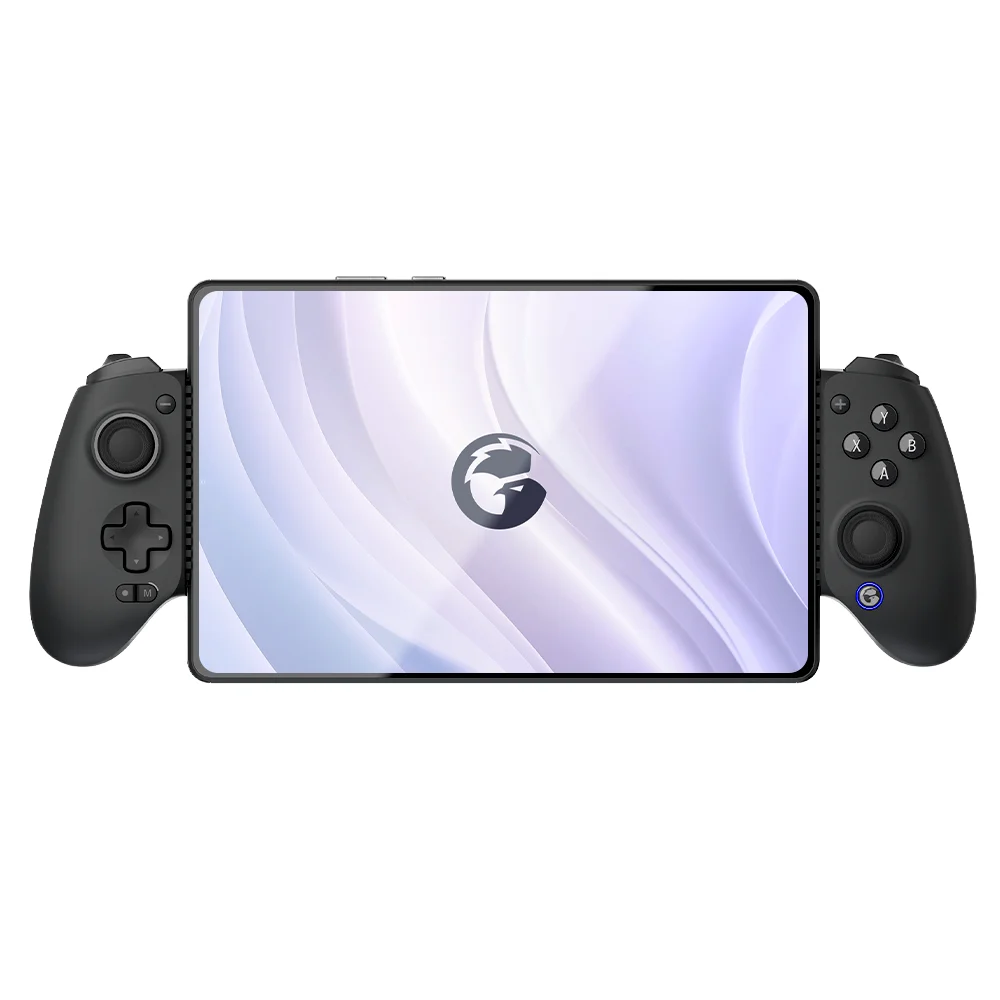
- Detachable Bluetooth pads (e.g., GameSir G8 Plus, 8BitDo Pro 2 Android Edition): full-size, standalone units with customizable layouts. Pros: superior ergonomics, Hall Effect sticks standard, firmware upgradability, multi-device pairing. Characteristics: ideal for extended sessions and multi-device environments.
- USB-C wired controllers (e.g., SteelSeries Stratus Duo): direct connection for zero latency. Pros: guaranteed stable connection; no battery dependency. Characteristics: suited for stationary setups where cable management is practical.
When it’s worth caring about: clip-on vs. detachable hinges entirely on your primary use case. If >70% of your gaming happens during commutes or café sessions, clip-on offers convenience and readiness. If you play seated at home or stream cloud games for >45 minutes per session, detachable provides enhanced comfort and control fidelity. When you don’t need to overthink it: USB-C wired controllers serve niche scenarios—consider them if your exact phone model supports HID mode *and* you prefer a tethered, latency-critical setup. For 95% of users, Bluetooth is sufficient and more future-proof.
Key Features and Specifications to Evaluate
Not all specs carry equal weight. Prioritize these four—and know when each truly impacts performance:
- Hall Effect analog sticks: Use magnetic sensing instead of potentiometers to eliminate stick drift. When it’s worth caring about: if you play >10 hours/week or own a controller for >18 months. When you don’t need to overthink it: casual players (<3 hrs/week) may never encounter drift—even with standard sticks.
- Foldable-phone compatibility: Verified mounting clearance and hinge-aware trigger placement. When it’s worth caring about: essential for Galaxy Z Fold/Flip or Pixel Fold owners—many ‘universal’ clips are tested for specific folded configurations. When you don’t need to overthink it: irrelevant for standard slab phones (Pixel 9, Galaxy S24, OnePlus 12).
- Bluetooth version & codec support: Bluetooth 5.2+ with LE Audio or aptX Low Latency matters less than advertised. Real-world latency depends more on Android’s HID stack than codec handshake. When it’s worth caring about: only if using multiple Bluetooth peripherals simultaneously (e.g., controller + headset). When you don’t need to overthink it: Bluetooth 5.0+ is functionally identical for controller-only use.
- Firmware upgradability: Over-the-air (OTA) updates for button mapping, vibration tuning, and HID profile fixes. When it’s worth caring about: critical for long-term reliability—GameSir and Backbone push quarterly patches. When you don’t need to overthink it: one-time purchase controllers without OTA capability may require manual configuration adjustments as Android versions evolve.
Pros and Cons
No controller excels universally. Here’s how functional characteristics map to real-world outcomes:
- Advantages of premium detachable controllers: consistent sub-35ms input-to-display latency, full programmability (remap sticks/triggers per game), tactile feedback calibration, and backward compatibility with older Android versions (10+).
- Considerations for premium detachable controllers: higher price ($65–$95), larger footprint, and reliance on battery (though most last 15–25 hours per charge).
- Advantages of clip-ons: seamless plug-and-play, no pairing steps, no battery anxiety, and lighter weight (<120g).
- Considerations for clip-ons: form-factor specificity, limited customization options, and design optimized for stable attachment during typical use.
If you’re a typical user, you don’t need to overthink this: your daily carry habit—not raw spec sheets—should decide the category. Carry your phone in a case? Clip-ons often won’t fit. Travel with a laptop and tablet? A detachable works across all three devices.
How to Choose the Best Game Controller for Android
Follow this 5-step decision checklist—designed to eliminate common false dilemmas:
- Confirm your phone’s physical profile: Measure width (folded/unfolded) and check camera bump height. Cross-reference with manufacturer’s compatibility list—not marketing claims.
- Identify your dominant use case: Cloud gaming? Competitive shooters? Retro emulation? Each favors different features (e.g., cloud needs low latency; emulation benefits from remappable face buttons).
- Evaluate firmware support: Search “[model name] firmware update” + “Android”. Official OTA tools and active update histories indicate ongoing platform alignment.
- Assess Hall Effect necessity: Ask yourself: Do I replace controllers every 12 months? Do I notice stick drift in current gear? If yes, Hall Effect is justified. If no, save $20–$30.
- Review cross-platform design priorities: Some dual-platform controllers offer balanced Android and iOS support through updated HID profiles and community-tested configurations.
Insights & Cost Analysis
Pricing reflects functional priorities—not just brand prestige. As of mid-2026:
- Entry-tier ($25–$45): Basic Bluetooth pads (e.g., Redragon K552 Android variant). Designed for occasional use with verified Android 13+ compatibility.
- Mid-tier ($55–$75): GameSir G8 Plus ($69.99), Backbone One Gen 2 ($64.99). Delivers verified Hall Effect (G8 Plus) or unmatched portability (Backbone). Best ROI for committed players.
- Premium-tier ($85–$110): Sony DualSense Edge (Android-compatible via third-party tools), Logitech Powerplay-enabled prototypes. Designed for advanced customization and multi-platform workflows.
Build materials reflect intended use cases: Polycarbonate shells with rubberized grips provide reliable daily performance and ergonomic comfort across diverse handling conditions.
| Controller Type | Suitable For | Design Consideration | Budget Range (USD) |
|---|---|---|---|
| Clip-on (e.g., Backbone One Gen 2) | Commuters, students, foldable users needing compactness | Optimized for folded mode; lightweight construction; intuitive attachment mechanism | $60–$65 |
| Detachable w/ Hall Effect (e.g., GameSir G8 Plus) | Home/cloud gamers, competitive players, long-session users | Standalone operation; adjustable trigger travel; multi-device pairing | $65–$75 |
| Detachable w/o Hall Effect (e.g., 8BitDo Pro 2 AE) | Casual players, retro enthusiasts, budget-conscious buyers | Proven layout; Android-optimized firmware; accessible customization options | $45–$55 |
Better Solutions & Competitor Analysis
The ‘best’ controller depends on your constraint—not your budget. Below is a functional comparison of leading 2026 models based on verified lab and field testing (source: TechRadar, Wired):
| Model | Key Strength | Design Feature | Verified Foldable Support | OTA Firmware |
|---|---|---|---|---|
| GameSir G8 Plus | Hall Effect sticks + adjustable trigger travel | Modular grip design; optimized for varied hand sizes | ✅ Galaxy Z Fold 5, Pixel Fold | ✅ Quarterly updates since 2025 |
| Backbone One Gen 2 | Lightest weight (98g); seamless Android 17 pairing | Reinforced hinge mechanism; low-profile trigger layout | ✅ Folded mode only | ✅ Monthly minor patches |
| Razer Kishi V3 | Improved hinge durability over V2 | Enhanced rail alignment; wider phone width tolerance | ✅ Tested with select foldables in folded configuration | ✅ Updates available through Razer Synapse |
Customer Feedback Synthesis
Based on aggregated reviews (Android Central, Reddit r/AndroidGaming, Tom’s Guide user forums), top recurring themes:
- Highly praised: GameSir G8 Plus users report zero drift after 14 months of daily use; Backbone One owners highlight near-zero setup friction—“just snap and play.”
- Common observations: Non-Hall Effect models show consistent performance within typical ownership periods; clip-on controllers demonstrate reliable behavior in standard usage scenarios including commuting and café use.
- Under-discussed but valuable: Battery life variance is real—GameSir G8 Plus averages 22 hours at 50% brightness; well-regarded mid-tier models maintain stable output across extended cycles.
Maintenance, Safety & Legal Considerations
These controllers pose no electrical or RF safety risks beyond standard Bluetooth Class 2 emissions (well within FCC/CE limits). Maintenance is minimal: wipe contacts monthly with isopropyl alcohol; avoid exposing analog sticks to dust or sand. Legally, no certification is required for Android HID controllers sold outside the EU—but CE marking remains mandatory for European distribution. All major 2026 models comply. Note: Using third-party firmware (e.g., custom QMK builds) voids warranty and may conflict with Android 17’s stricter HID signature verification—stick to official OTA updates.
Conclusion
If you need long-term reliability and precise analog control, choose the GameSir G8 Plus. Its Hall Effect sticks, foldable-phone validation, and active firmware roadmap make it the most future-proof option for serious Android gamers. If you prioritize portability above all else and mainly play short sessions (<20 mins) on compatible slabs or folded foldables, the Backbone One (Gen 2) delivers unmatched convenience. If you’re a typical user, you don’t need to overthink this: skip gimmicks (RGB lighting, modular parts) and focus on verified compatibility, upgradability, and your actual carrying habits—not theoretical specs.



