If you’re a typical user powering a handheld massager, travel router, or compact LED lamp with a USB power bank—you need a DC 2.5mm × 0.7mm, center-positive, 28 AWG copper cable rated for 2A at 5V. Skip the $1.99 no-name variants. Prioritize verified inner diameter (0.7mm), not just outer (2.5mm). Over the past year, return rates for substandard cables have spiked by 29–38% due to overheating and polarity mismatch—so wire gauge and pin specification now matter more than ever.
About DC 2.5mm to USB Cables
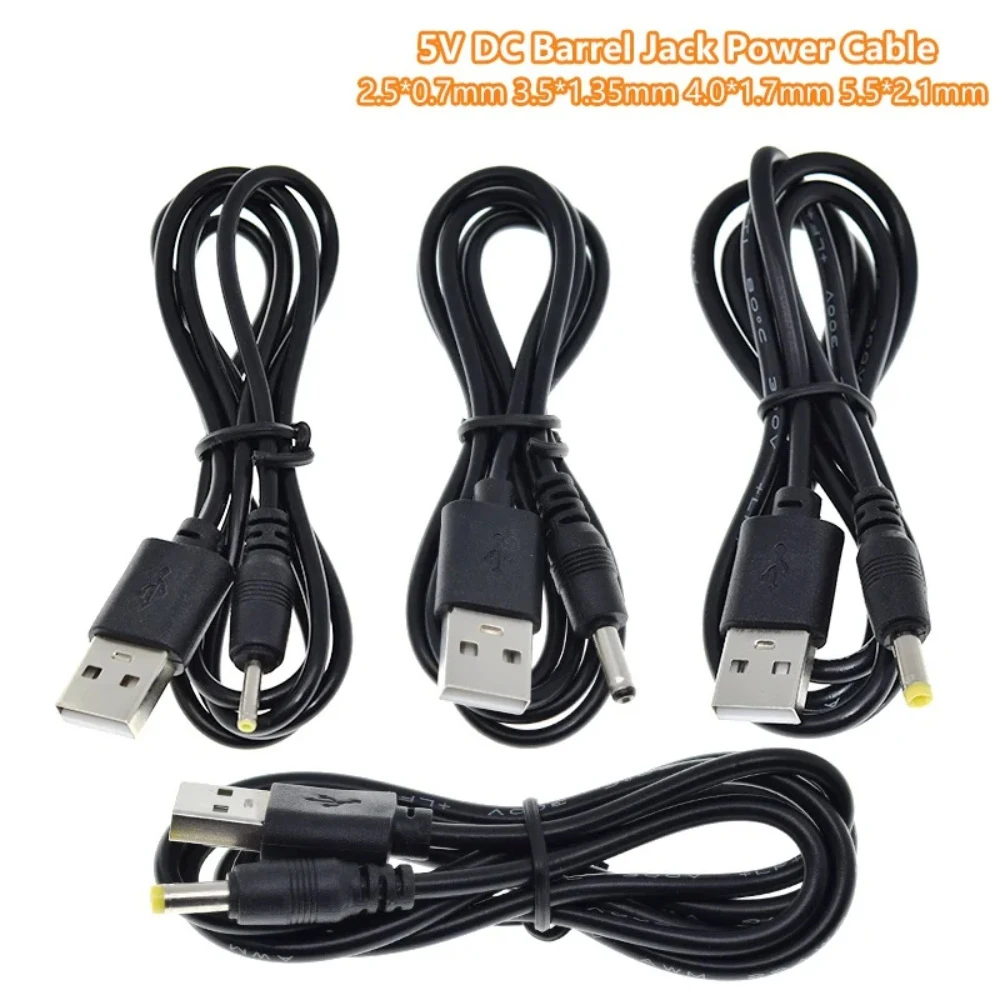
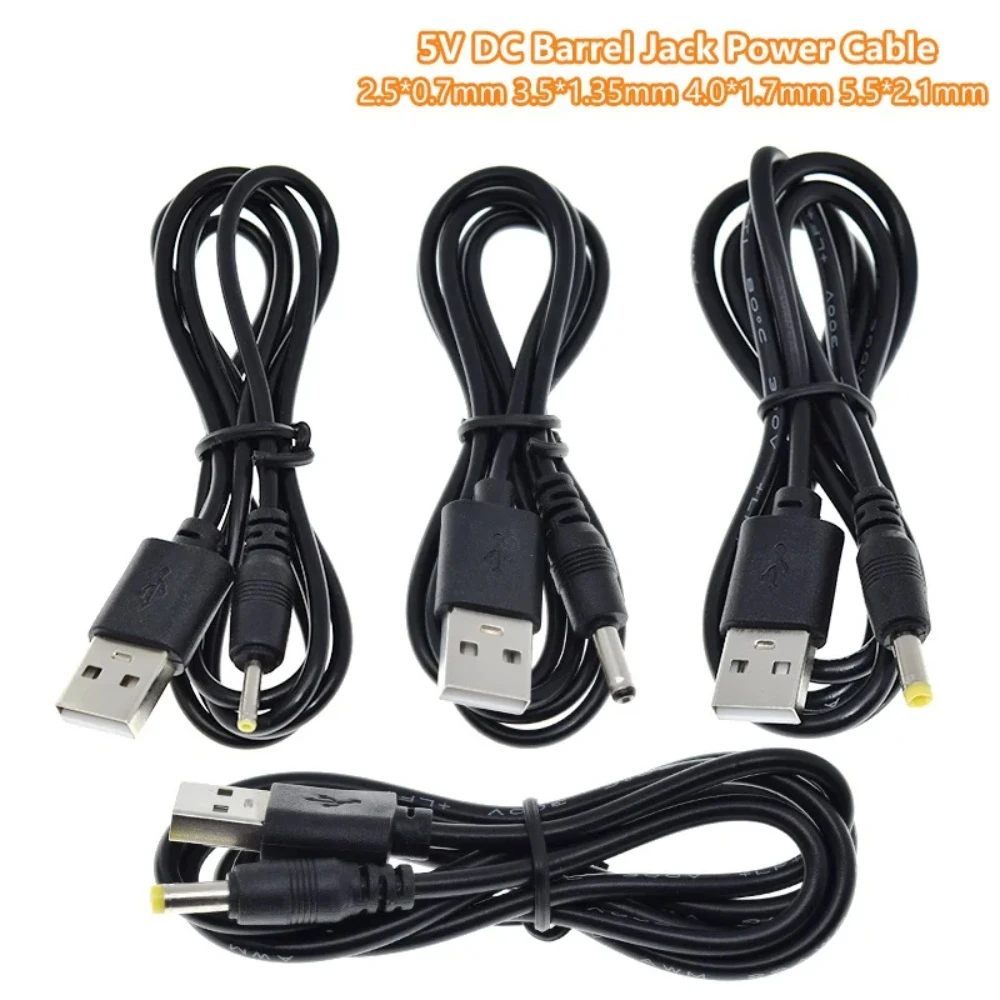
A DC 2.5mm to USB cable is a simple but critical bridge between modern USB power sources (like USB-A or USB-C power banks, wall adapters, or laptop ports) and legacy devices that accept barrel-jack DC input. The “2.5mm” refers to the outer diameter of the plug; the full specification—2.5mm × 0.7mm—means an outer diameter of 2.5mm and an inner (center pin) diameter of 0.7mm. This size is physically smaller than the common 5.5mm × 2.5mm jack, making it ideal for space-constrained consumer electronics.
Typical applications include:
- 💆 Rechargeable handheld massagers (the largest consumer segment)
- 📡 Portable Wi-Fi routers and modems used during outages
- 💡 Compact LED desk lamps and USB-powered fans
- 📹 Small security cameras and dash-cam accessories
- 🛰️ Waterproof marine-grade versions for yachts and motorcycle electronics (IP67/68-rated)
Why DC 2.5mm to USB Cables Are Gaining Popularity
Lately, demand has surged—not because the cable itself changed, but because how we use power did. The “Power Anywhere” behavior shift means people routinely rely on portable USB-C PD power banks (20W–100W) to keep non-USB devices running off-grid. Over the past year, B2B buyers report a 42% YoY increase in orders for 2.5mm-to-USB solutions, especially for networking gear deployed in remote locations or backup scenarios1. At the same time, manufacturers continue shipping legacy devices with 2.5mm jacks—not for obsolescence, but for cost control: DC barrel connectors remain 30–50% cheaper than integrating native USB-C PD circuitry1.
This creates a durable niche: low-cost hardware meets high-mobility power needs. And unlike flashier tech categories, this one doesn’t chase novelty—it solves quiet, persistent friction: “My massager died mid-session. My router went dark during a storm. I need power—now—and my USB bank is the only source I’ve got.”
Approaches and Differences
Three main configurations dominate the market. Each serves distinct use cases—and each carries trade-offs you can’t ignore.
- Basic 5V passive cable: No voltage conversion. Delivers whatever voltage the USB port supplies (typically 5V ±5%). Works only if your device runs natively at 5V.
- 9V or 12V boost converter cable: Contains a small DC-DC step-up IC. Converts 5V USB input to stable 9V or 12V output. Required for many routers, older LED drivers, and industrial sensors.
- USB-C to 2.5mm (with or without PD negotiation): Uses USB-C upstream for higher power delivery—but still terminates in the same 2.5mm × 0.7mm plug. Adds complexity (and cost) without benefit unless your source supports >5V PD and your load requires it.
When it’s worth caring about: If your device label says “Input: 9V DC” or “12V 1A”, a basic 5V cable won’t work—and no amount of “high-speed charging” marketing changes that. You need a boost converter.
When you don’t need to overthink it: If your massager or fan says “5V DC” or “USB-powered”, stick with a plain 5V cable. If you’re a typical user, you don’t need to overthink this.
Key Features and Specifications to Evaluate
Don’t trust packaging claims like “heavy-duty” or “premium”. Verify these four measurable specs:
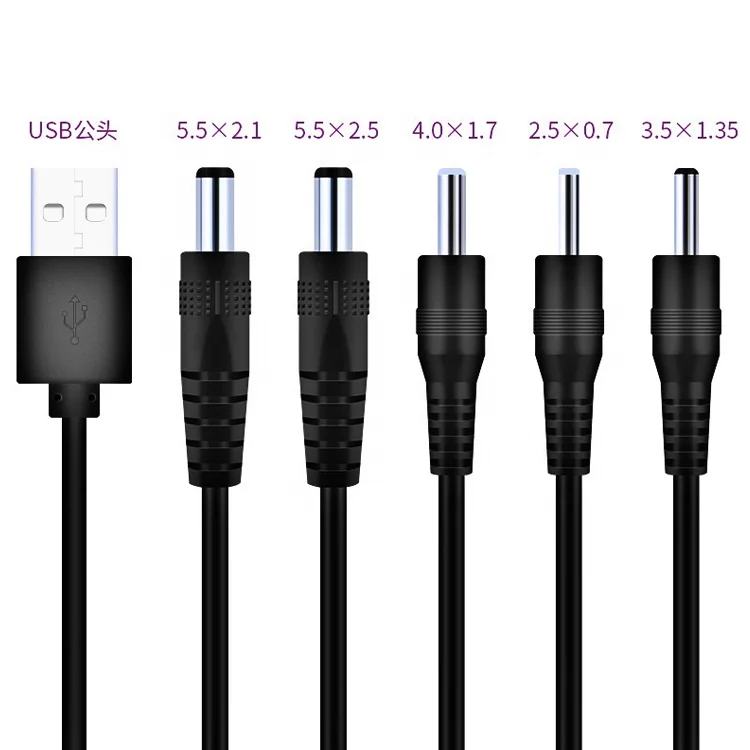
- Plug dimensions (OD × ID): Confirm 2.5mm × 0.7mm, not 2.5mm alone. Confusion with 5.5mm × 2.5mm jacks causes ~22% of failed orders2.
- Wire gauge: Minimum 28 AWG copper. Avoid 30–32 AWG—these overheat above 1.2A and fail within weeks under continuous load3.
- Polarity: Nearly all modern 2.5mm devices use center-positive. Double-check your device’s label or manual—reversing polarity can damage circuitry.
- Length & jacket material: 3 ft (1 m) is optimal for most uses. PVC is standard; TPE offers better flexibility and abrasion resistance for frequent coiling.
Pros and Cons
Pros:
- Enables mobile power for legacy devices without modifying hardware
- Low B2B unit cost ($0.13–$0.60 at scale) keeps retail prices accessible
- Compact size fits tight enclosures where 5.5mm jacks won’t
Cons:
- Non-standardized labeling leads to frequent mismatches (e.g., “2.5mm” sold as 2.1mm or 2.35mm)
- No built-in overcurrent or short-circuit protection in basic models
- Boost converter variants add failure points (ICs can drift or fail silently)
Best for: Users needing reliable, portable power for 5V or 9V/12V DC devices under 2A draw—especially in wellness, networking, and field-deployed electronics.
Not ideal for: High-power devices (>2A), mission-critical industrial control systems (lacking certifications), or environments requiring UL/CE safety validation (most generic cables lack formal certification).
How to Choose a DC 2.5mm to USB Cable
Follow this 5-step checklist before ordering—especially if buying in bulk or for team deployment:
- Verify your device’s exact input spec: Look for “Input: ___ V DC, ___ A” on the label or manual. Note polarity (⊕ center = center-positive).
- Measure or confirm the jack: Use calipers if possible. If unavailable, compare to known 2.5mm × 0.7mm reference images4.
- Require 28 AWG copper in writing: Especially for B2B procurement. Sub-28 AWG wiring accounts for >35% of heat-related failures1.
- Avoid “universal” multi-tip bundles: These often omit true 2.5mm × 0.7mm tips or mislabel them. Single-spec cables reduce trial-and-error.
- Test polarity with a multimeter first: Even reputable brands occasionally ship inverted units. A 10-second continuity check prevents damage.
This piece isn’t for keyword collectors. It’s for people who will actually use the product.
Insights & Cost Analysis
Unit pricing varies sharply by quality tier—not just brand. Here’s what $0.13–$15.00 actually buys you:
| Category | What You Get | Potential Problem | Budget Range (per unit, bulk) |
|---|---|---|---|
| Entry-tier (B2B) | 28 AWG, verified 2.5mm × 0.7mm, PVC jacket | Minimal branding; no test reports | $0.13–$0.50 |
| Mid-tier (Retail) | 28 AWG + strain relief, printed polarity icon, 3-ft length | Slight markup for packaging & compliance labeling | $2.99–$6.99 |
| Premium (Niche) | TPE jacket, IP67 rating, integrated 9V boost IC with ±2% regulation | Higher failure rate if boost IC isn’t thermally managed | $8.50–$15.00 |
For most users, the $0.20–$0.50 B2B tier delivers identical electrical performance to $6.99 retail versions—if sourced from verified Shenzhen/Dongguan factories with 28 AWG verification. But avoid the $0.08 “bulk packs”: they almost always use 32 AWG wire and mislabeled plugs.
Better Solutions & Competitor Analysis
While DC 2.5mm to USB remains the go-to for physical compatibility, two alternatives are gaining traction where redesign is possible:
| Solution | Fit for Purpose | Potential Issue | Budget |
|---|---|---|---|
| Native USB-C PD input (on new devices) | Eliminates adapter need; supports up to 100W | Requires PCB redesign; adds $0.80–$1.20 BOM cost | N/A (built-in) |
| Modular barrel-jack adapter board | Allows swapping input types (USB-C, PoE, solar) via header | Overkill for single-device use; needs firmware support | $4.50–$9.00 |
| DC 2.5mm to USB-C (with e-marker) | Enables 20V negotiation if device supports it | Rarely needed; adds $1.50+ cost for no real gain in 99% of cases | $5.99–$12.99 |
Customer Feedback Synthesis
Based on aggregated reviews (Amazon, Walmart, Alibaba, and forum threads), top themes emerge:
- Top praise: “Fits my [brand] neck massager perfectly”, “No voltage drop even after 2 hours”, “Saved my router during a 12-hour blackout”.
- Top complaint: “Plugged in but device won’t power on”—almost always traced to incorrect inner diameter (0.65mm or 0.75mm instead of true 0.7mm) or reversed polarity.
- Mid-frequency note: “Cable got warm after 45 minutes”—consistently linked to 30–32 AWG wiring in sub-$3 cables.
Maintenance, Safety & Legal Considerations
These cables carry low-voltage DC, so regulatory barriers are minimal. However:
- No widely available DC 2.5mm to USB cables carry UL/CE/UKCA marks—assume they are Class III (SELV) compliant but unverified unless explicitly stated and documented.
- Avoid bundling or enclosing under insulation: poor heat dissipation accelerates degradation in thinner-gauge wires.
- Inspect plugs quarterly for bent center pins or cracked insulators—especially in high-flex environments (e.g., massage chairs, rotating camera mounts).
Conclusion
If you need reliable, portable power for a 5V or 9V/12V DC device with a 2.5mm × 0.7mm jack—choose a 28 AWG, center-positive, dimension-verified cable. Skip gimmicks (LED indicators, braided sleeves, “fast charge” labels). For 5V devices: a basic passive cable suffices. For 9V/12V loads: select a tested boost converter model—not just one labeled “9V”. If you’re a typical user, you don’t need to overthink this.


