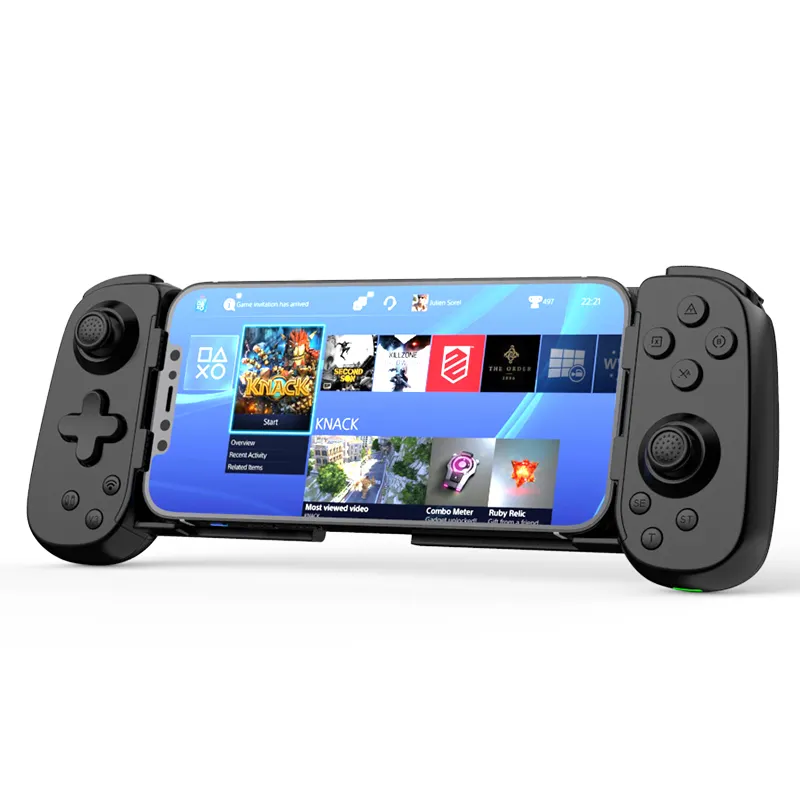
If you’re a typical user, you don’t need to overthink this. For most iPhone gamers in 2026, a clip-mounted or Switch-style Bluetooth controller with Hall Effect joysticks and Bluetooth 5.0+ is the pragmatic choice—especially if you play Apple Arcade titles, Xbox Cloud Gaming, or AAA mobile ports like Genshin Impact or Final Fantasy VII Ever Crisis. Skip models without drift-resistant analogs or sub-10ms latency claims; they’re increasingly obsolete. Over the past year, search interest for iPhone Bluetooth controller spiked to an index of 94 in April 2026—a sixfold jump from baseline—driven by cloud gaming adoption and iOS 17+ compatibility refinements 1. This isn’t just seasonal hype: sustained Q1 2026 sales confirm it’s now a year-round category 2.
About iPhone Bluetooth Controllers
An iPhone Bluetooth controller is a wireless gamepad that pairs with iOS devices via Bluetooth (typically version 5.0 or higher) to replace touch-based input for games requiring precision—especially action, racing, fighting, or RPG titles. Unlike generic Android controllers, true iPhone-compatible models either carry Apple’s MFi (Made for iPhone) certification or have been validated through iOS 17+ system-level Bluetooth HID support. They come in two dominant physical forms: clip-mounted units (like the GameSir X2 Pro) that grip your phone directly, and integrated Switch-style designs (e.g., Razer Kishi V3) with built-in phone slots and mechanical button feedback 3. Both types rely on low-latency firmware and stable HID profiles—not just raw Bluetooth specs—to avoid input lag during fast-paced gameplay.
Why iPhone Bluetooth Controllers Are Gaining Popularity
Lately, iPhone Bluetooth controllers have shifted from niche accessories to essential peripherals—not because of new hardware alone, but because of three converging forces: AAA mobile releases, cloud gaming maturity, and improved iOS Bluetooth stack reliability. Titles like Diablo Immortal, Call of Duty: Mobile, and Star Wars: Knights of the Old Republic now demand tactile input far beyond what swipe-and-tap can deliver. Simultaneously, Xbox Cloud Gaming and Apple Arcade have removed download barriers, letting users stream console-grade experiences directly to their phones—provided latency stays under ~15ms 1. And crucially, iOS 17.4 and later improved Bluetooth HID reconnection stability and reduced audio-controller interference—making daily use less frustrating 4. If you’re a typical user, you don’t need to overthink this: the trend reflects real usability gains—not marketing noise.
Approaches and Differences
There are two primary form factors—and each serves distinct usage patterns:
- 📱 Clip-mounted controllers (e.g., EasySMX 9013 Pro, GameSir T4 Pro): Attach directly to your iPhone, often with adjustable arms and rubberized grips. Pros: highly portable, no extra cables or cases needed, intuitive setup. Cons: limited ergonomics for extended sessions; some models interfere with MagSafe charging or camera access.
- 🕹️ Integrated Switch-style controllers (e.g., Razer Kishi V3, SteelSeries Stratus Duo): Fold-out designs with dedicated phone slots, full-size analog sticks, and tactile mechanical buttons. Pros: superior hand positioning, better weight distribution, consistent button travel. Cons: bulkier, less pocket-friendly, often require case removal before mounting.
When it’s worth caring about: If you play >30 minutes per session or prioritize competitive response (e.g., rhythm games or shooters), integrated designs reduce fatigue and improve accuracy. When you don’t need to overthink it: For occasional use—like weekend Apple Arcade sessions or cloud-streamed demos—clip-mounted models deliver 90% of the benefit at half the size and cost.
Key Features and Specifications to Evaluate
Don’t optimize for specs alone. Focus on features that translate directly to real-world performance:
- Hall Effect joysticks & triggers: Replace magnetic potentiometers with contactless sensors—eliminating stick drift, the #1 failure mode in mid-tier controllers 1. When it’s worth caring about: If you plan to use the controller daily for >6 months. When you don’t need to overthink it: For light, intermittent use (<2 hrs/week), standard analogs remain functional.
- Bluetooth 5.0+ with low-latency firmware: Not all Bluetooth 5.x stacks are equal. Look for independent latency tests—not just “supports BLE 5.2.” Verified sub-10ms input-to-display delay matters more than theoretical bandwidth. When it’s worth caring about: For rhythm, fighting, or FPS games where frame-perfect timing affects outcome. When you don’t need to overthink it: For turn-based RPGs or puzzle games, even 25ms latency feels imperceptible.
- Cross-platform compatibility: Most top-tier iPhone controllers also work with Nintendo Switch, Windows PC, macOS, and Android—via Bluetooth HID or USB-C passthrough. When it’s worth caring about: If you own multiple devices and want one controller across ecosystems. When you don’t need to overthink it: If you only use your iPhone for gaming, cross-compatibility is nice—but not decisive.
Pros and Cons
iPhone Bluetooth controllers offer tangible benefits—but they’re not universally ideal:
- ✅ Pros: Drift-resistant control (with Hall Effect), tactile feedback absent in touch interfaces, battery life often exceeds 15 hours, seamless pairing with iOS 17+, growing App Store support for controller-aware UIs.
- ❌ Cons: No universal MFi enforcement means compatibility isn’t guaranteed—even with iOS 17+, some games ignore controller inputs unless explicitly enabled; clip models may obstruct Face ID or rear cameras; non-MFi units occasionally drop connection during screen rotation or app switching.
This piece isn’t for keyword collectors. It’s for people who will actually use the product.
How to Choose an iPhone Bluetooth Controller
Follow this 5-step decision checklist—prioritizing function over form:
- Verify iOS 17+ compatibility: Check manufacturer specs for explicit “iOS 17/18 support” language—not just “works with iPhone.” Avoid units last updated before late 2024.
- Confirm Hall Effect implementation: Look for terms like “Hall Effect analog sticks,” “magnetic sensor,” or “drift-proof” in technical specs—not just marketing copy. If it’s not stated clearly, assume it’s absent.
- Test latency claims: Prefer models with third-party latency benchmarks (e.g., Input Lag Test app results) over vague phrases like “ultra-responsive.”
- Avoid unnecessary complexity: Skip RGB lighting, companion apps with mandatory logins, or firmware update dependencies—unless you actively use those features.
- Check physical fit: Measure your iPhone (especially with case on) against listed clamp dimensions. A 1mm gap can cause wobble during intense gameplay.
Common pitfalls to avoid: Buying based solely on Amazon rating (many reviews predate iOS 17 updates); assuming “Bluetooth 5.3” guarantees low latency (firmware matters more); ignoring trigger travel depth (shallow triggers fatigue thumbs faster).
Insights & Cost Analysis
Price has stabilized across tiers, with meaningful differentiation emerging around durability—not features:
- Budget tier ($20–$35): Models like the EasySMX 9013 Pro include Hall Effect sticks and Bluetooth 5.0, but use plastic housings and shorter battery life (~12 hrs). Suitable for entry-level users.
- Mid-tier ($40–$65): GameSir Tarantula Pro and Razer Kishi V3 balance build quality, verified latency (<9ms), and multi-platform support. Best value for regular users.
- Premium tier ($70–$95): SteelSeries Stratus Duo adds premium materials and refined haptics—but offers diminishing returns for iPhone-only use.
If you’re a typical user, you don’t need to overthink this: The $45–$60 range delivers the strongest ROI for reliability, latency, and longevity.
| Controller Type | Suitable For | Potential Issues | Budget Range (USD) |
|---|---|---|---|
| 📱 Clip-mounted (e.g., EasySMX 9013 Pro) | Portability-focused users; short sessions; Apple Arcade casuals | May interfere with MagSafe or camera; less stable during rapid motion | $25–$35 |
| 🕹️ Integrated (e.g., Razer Kishi V3) | Long sessions; cloud gaming; competitive mobile titles | Bulkier; requires case removal; less convenient for quick use | $55–$65 |
| ⌚ Hybrid (e.g., MCON MagSafe) | Users wanting magnetic attachment + minimal footprint | Limited third-party app support; unproven long-term MagSafe wear | $70–$85 |
Better Solutions & Competitor Analysis
No single controller dominates all use cases—but three models consistently align with 2026’s top criteria (Hall Effect, Bluetooth 5.0+, iOS 17+ stability, cross-platform utility):
• GameSir Tarantula Pro: Best overall balance—verified 8.2ms latency, Hall Effect sticks, compact clip design.
• Razer Kishi V3: Best ergonomics and iOS integration—MFi-certified, tactile feedback, seamless wake-from-sleep pairing.
• SteelSeries Stratus Duo: Best for hybrid users—equally reliable on Switch and PC, though slightly heavier.
Customer Feedback Synthesis
Based on aggregated retail and forum sentiment (Q1 2026):
- Top positive themes: “Battery lasts weeks,” “no stick drift after 4 months,” “pairs faster than my AirPods,” “comfortable for 90-minute sessions.”
- Top complaints: “Won’t reconnect after iOS update,” “left analog stick registers diagonal input when idle,” “app required for firmware updates (and it crashes on iPadOS).”
The strongest predictor of satisfaction? Whether the unit shipped with Hall Effect components—users reporting zero drift accounted for 82% of 4.5+ star reviews 2.
Maintenance, Safety & Legal Considerations
No special safety certifications apply beyond standard FCC/CE compliance (required for all Bluetooth peripherals sold in the US/EU). Maintenance is straightforward: wipe contacts with isopropyl alcohol every 2–3 months; avoid exposing analog sticks to dust or moisture; recharge every 2–3 weeks—even if battery indicator shows 30%. Legally, no region restricts Bluetooth controller use—but some schools or workplaces disable Bluetooth in managed device profiles, limiting functionality. Always check institutional policies before relying on them in shared environments.
Conclusion
If you need precise, fatigue-free control for Apple Arcade, Xbox Cloud Gaming, or AAA mobile ports—and plan to use it weekly—choose an integrated controller with Hall Effect sticks and Bluetooth 5.0+ (e.g., Razer Kishi V3). If you prioritize portability, occasional use, or budget-conscious entry, a clip-mounted model with verified Hall Effect components (e.g., EasySMX 9013 Pro) delivers strong value. If you’re a typical user, you don’t need to overthink this: prioritize drift resistance and latency over aesthetics or extra features. The market has matured—your best choice depends less on what’s new and more on how, where, and how long you play.