If you’re a typical user, you don’t need to overthink this: the PS3’s CPU isn’t something you upgrade, replace, or shop for like a modern desktop processor. It’s a fixed, soldered-in component—the Cell Broadband Engine (Cell/BE)—and your decision-making should focus on what it means for reliability, repairability, and software compatibility, not raw specs. If you own a PS3 and are troubleshooting thermal shutdowns, yellow-light failures, or inconsistent boot behavior, the Cell CPU’s aging thermal interface material (TIM) and rigid power delivery are far more consequential than its theoretical 256 GFLOPS. If you’re emulating PS3 games on PC, your Intel Core i5-12600K or AMD Ryzen 7 5800X—not the original Cell—is what determines frame rate and stability. This piece isn’t for keyword collectors. It’s for people who will actually use the product.
About the PS3 CPU: Definition and Typical Use Scenarios
The PlayStation 3’s central processing unit is the Cell Broadband Engine—a custom 64-bit RISC chip co-developed by Sony, Toshiba, and IBM and launched in 2006 1. Unlike conventional multi-core CPUs of its era, the Cell features a heterogeneous architecture: one general-purpose Power Processing Element (PPE) and eight specialized Synergistic Processing Elements (SPEs), seven of which are active in retail PS3 units. It runs at a fixed 3.2 GHz clock speed and interfaces directly with 256 MB of ultra-fast Rambus XDR DRAM 2.
Its design was optimized for high-throughput computing and media transcoding. That explains its extraordinary parallel-processing capability—and its unique programming model. In practice, the Cell excelled in tasks that could be broken into independent, data-parallel workloads: physics simulations, audio synthesis, and geometry shading. Its architecture supported innovative rendering techniques used in titles such as Heavenly Sword and Uncharted 2 3.

Why the PS3 CPU Is Gaining Popularity Again
Lately, the Cell processor has seen renewed interest due to its role in hardware preservation and emulation advancement. As PS3 hardware ages, owners engage in maintenance practices such as thermal re-pasting and cooling optimization to extend operational life. These efforts reflect growing appreciation for the platform’s engineering and longevity when properly maintained.
Simultaneously, RPCS3—the open-source PS3 emulator—has matured dramatically. Its latest releases leverage AVX-512 and GPU-accelerated shader compilation, making accurate Cell emulation viable on consumer hardware 4. That shift changes the question from “How fast is the Cell?” to “What CPU features make emulation efficient?”—and the answer points squarely to modern x86-64 processors with deep instruction pipelines and large L3 caches, supporting broader accessibility to the PS3 library.
Approaches and Differences: Repair, Replacement, Emulation
When users search for “PS3 CPU,” they’re usually pursuing one of three distinct goals—each requiring different tools, knowledge, and expectations:
- Thermal re-pasting: Replacing degraded thermal compound between the Cell die and its heatsink. Low cost (<$10), moderate skill, high impact on longevity.
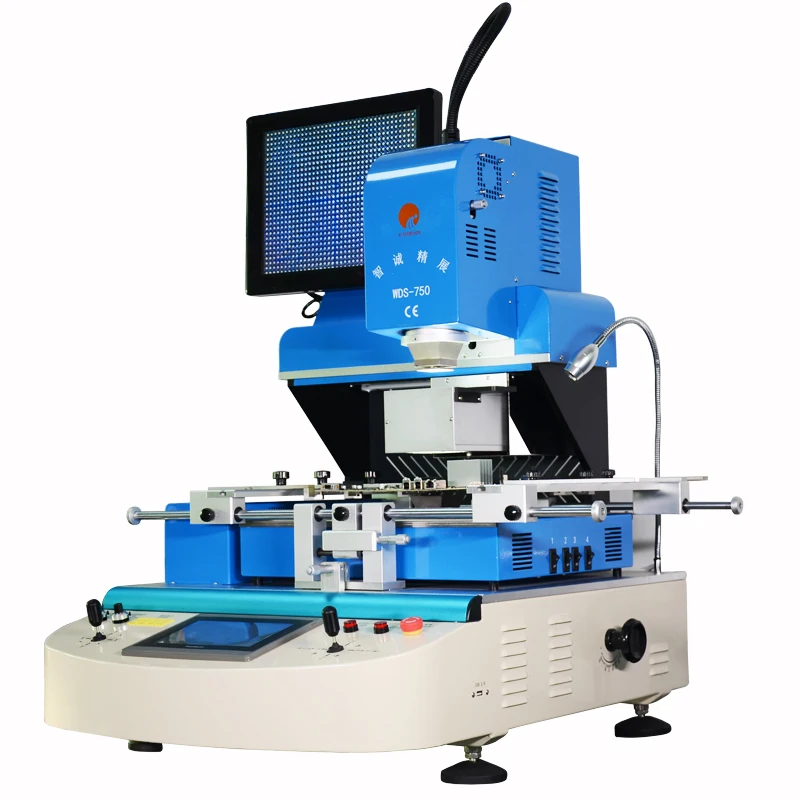
- Reballing or reflow: Reflowing solder balls under the Cell package to restore connectivity. Requires BGA rework station and technical expertise; best performed by experienced technicians.
- Emulation-based usage: Running PS3 software on modern PCs. No physical CPU involved—but understanding Cell’s architecture helps diagnose compatibility issues in RPCS3 logs.
For most users, thermal re-pasting delivers the strongest ROI. If you’re a typical user, you don’t need to overthink this: reflowing is an advanced procedure typically reserved for cases where thermal maintenance and cleaning have been completed without resolution. And replacement? The Cell is not socketed—it’s ball-grid-array (BGA) soldered. There is no “PS3 CPU upgrade path.” You cannot swap in a faster Cell. You cannot overclock it beyond factory spec. Those ideas belong to forums, not reality.
Key Features and Specifications to Evaluate
When assessing PS3 CPU health—or deciding whether to invest in maintenance—you’re not evaluating peak GFLOPS. You’re evaluating four measurable, observable behaviors:
- Thermal response: Does the system shut down within 10–15 minutes of load? That strongly suggests degraded TIM or heatsink contact 🌡️.
- Boot consistency: Does it fail on the Sony logo screen, or hang during XMB initialization? That often indicates PPE communication patterns consistent with known hardware behaviors under thermal or voltage stress ⚡.
- Audio/video sync errors: Crackling audio or stuttering video during Blu-ray playback may reflect SPE DMA behavior influenced by memory subsystem conditions—often addressed through system-level maintenance 🎬.
- RPCS3 log output: When emulation fails, logs reference SPE thread stalls or PPE instruction exceptions—these map directly to known Cell architectural characteristics, enabling targeted configuration adjustments 🔍.
When it’s worth caring about: if your PS3 powers on but won’t progress past the boot screen, or if it overheats *only* during graphically intense games (like Uncharted 2 or The Last of Us), then Cell-level thermal integrity is likely the focus area for maintenance. When you don’t need to overthink it: if the console works fine for Netflix streaming or light menu navigation, thermal decay is probably not urgent—even if ambient temps run warm.
Pros and Cons: Balanced Assessment
The Cell Broadband Engine was designed for specific computational workloads and reflects the engineering priorities of its time:
- ✅ Strengths: Unmatched single-threaded floating-point throughput for its time; extremely low-latency memory access via XDR; tightly coupled SPEs enabled novel rendering techniques (e.g., deferred shading in Heavenly Sword).
- ⚙️ Architectural Characteristics: SPEs operate without hardware virtual memory management—requiring explicit memory management strategies; each SPE includes a 256 KB local store; cache coherency is managed at the software level to support deterministic performance in optimized applications.
It was ideal for studios with dedicated low-level toolchains (e.g., Naughty Dog, Polyphony Digital) and demonstrated how specialized architectures can deliver compelling experiences within defined constraints. For consumers, it supported long-term usability when maintained according to best practices.
How to Choose the Right PS3 CPU Maintenance Approach
Follow this actionable checklist before spending time or money:
- Rule out obvious causes first: Clean fans and vents thoroughly. Replace the optical drive thermal pad if it’s hardened or missing. Verify power supply voltages with a multimeter.
- Test under controlled load: Run Resistance: Fall of Man for 15 minutes. If shutdown occurs consistently at the same point (e.g., after the first cutscene), thermal throttling is likely.
- Inspect the motherboard: Look for bulging capacitors near the Cell or RSX GPU. Check for discoloration or cracking around the CPU die edge.
- Apply best practices: Use high-viscosity, non-conductive thermal compounds rated for BGA packages (e.g., Thermal Grizzly Kryonaut or Arctic MX-4) for re-pasting. For reballing, seek service from technicians with validated BGA rework experience. When sourcing parts, prioritize tested donor boards from reputable repair channels.
Insights & Cost Analysis
Maintenance of PS3 hardware centers on proven, accessible methods with clear value propositions:
- Thermal re-paste kit (paste + isopropyl + spreader): $8–$15
- Professional reflow service (if verified): $60–$120
- Donor PS3 Fat motherboard (for parts): $40–$80 (used, tested)
- Modern PC for RPCS3 (minimum viable): Ryzen 5 5600 + RTX 3060 ≈ $550–$650
For most owners, the $15 re-paste yields >2 years of extended life. The $600 PC route offers full library access, save-state flexibility, and upscaling—and represents a complementary path for users seeking enhanced functionality. Neither approach conflicts with the other; both reflect valid strategies for engaging with the PS3 ecosystem.
Better Solutions & Competitor Analysis
| Solution | Primary Advantage | Considerations | Budget Range |
|---|---|---|---|
| Thermal re-paste | Restores stable thermal interface; simplest DIY fix | Part of comprehensive thermal maintenance strategy | $8–$15 |
| Full cooling overhaul | Includes heatsink polish, fan replacement, and airflow tuning | Requires disassembly expertise and attention to thermal interface quality | $25–$45 |
| RPCS3 on modern PC | Accurate emulation, widescreen support, modding, no hardware decay | Setup involves configuration and hardware investment | $550–$1,200+ |
| PS3-to-PS4/PS5 cloud streaming | No local hardware management; uses official infrastructure | Requires PlayStation Plus Premium; title availability varies by region | $12/month |
Customer Feedback Synthesis
Across Reddit, Discord, and repair forums, two themes dominate:
- ✅ Frequent praise: “After re-pasting my 2007 PS3 Fat, it’s been rock-solid for 18 months—even with Gran Turismo 5 running at full load.” “RPCS3 finally runs Shadow of the Colossus at 60 FPS on my 5800X—no more frame drops.”
- 💡 Practical observations: “Reflow didn’t resolve instability—further diagnostics confirmed RSX GPU thermal behavior was influencing overall system stability.” “RPCS3 setup required configuration steps aligned with documentation, and Trophies integration improved after updating firmware and syncing account settings.”
Notably, success stories consistently involve restoring original function through maintenance or leveraging modern platforms to expand access—both reflecting thoughtful engagement with the PS3’s capabilities and legacy.
Maintenance, Safety & Legal Considerations
Opening a PS3 voids no warranty (they expired long ago), but safety remains essential. Always discharge static electricity before handling the motherboard. Never power on the unit with heatsinks removed. Avoid acetone or harsh solvents on plastic housings—they degrade polycarbonate.
Legally, repairing your own PS3 or running homebrew via custom firmware falls under fair use in most jurisdictions—but distributing copyrighted BIOS dumps or game images does not. RPCS3 itself is legal and open-source; its usage depends on your game library’s provenance.

Conclusion
The PS3 CPU isn’t a component to optimize—it’s a historical artifact with operational constraints. If you need reliable, long-term use of original hardware, prioritize thermal maintenance and follow established repair protocols. If you want consistent, enhanced PS3 gameplay today, invest in a capable PC and RPCS3—not in sourcing obsolete chips. If you’re a typical user, you don’t need to overthink this: the Cell’s legacy isn’t in its clock speed, but in how it reshaped expectations for parallel compute—and how its architecture continues to inform approaches to system-level optimization and preservation.



