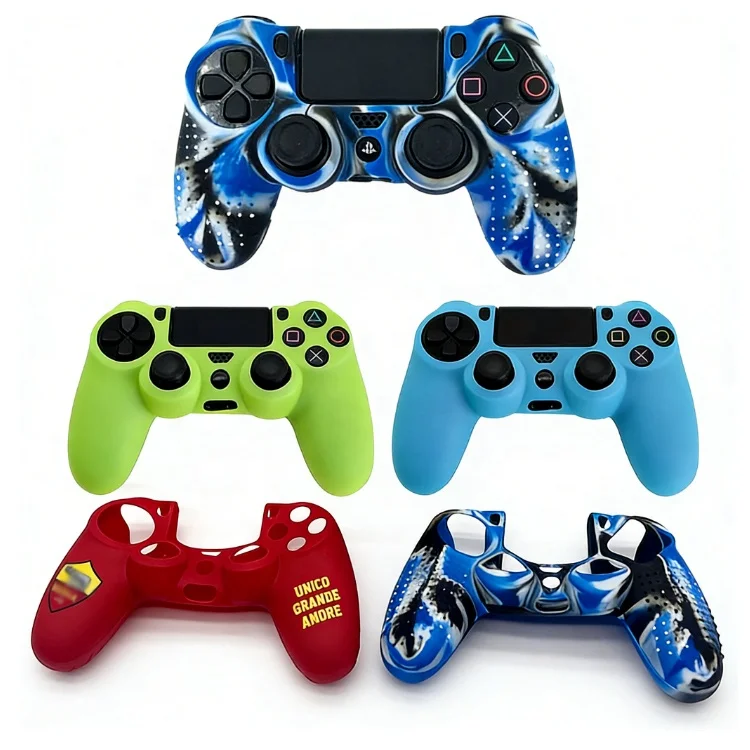
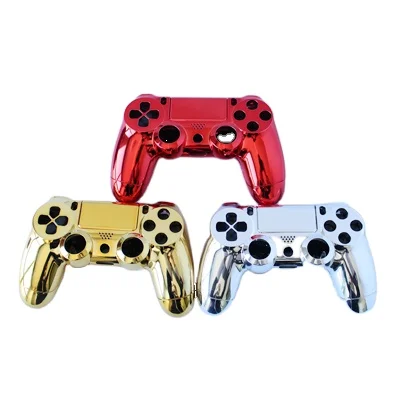
Over the past year, demand for PS4 custom shells has shifted—not toward novelty alone, but toward durability, modularity, and functional compatibility. If you’re replacing a cracked PS4 Slim top cover or upgrading your controller’s grip and aesthetics, how to choose between full console housings, controller shells, and skins is no longer trivial—it’s a decision that affects longevity, thermal behavior, and daily usability. For most users: controller shells are low-risk, high-impact upgrades; full console housings require technical confidence and model-specific verification. If you’re a typical user, you don’t need to overthink this. Consider OEM-replacement options when repairing hardware failure—and verify part-number matching (e.g., CUH-1215A vs. CUH-2015B) when selecting third-party shells to ensure precise fit across PS4 Pro, Slim, and original models. This piece isn’t for keyword collectors. It’s for people who will actually use the product.
About PS4 Custom Shells: Definition & Typical Use Cases
A PS4 custom shell refers to any aftermarket outer housing designed to replace or overlay the original plastic casing of either the console unit (PS4, PS4 Slim, PS4 Pro) or the wireless controller (DualShock 4). Unlike vinyl skins—which adhere to surfaces—shells are structural replacements: they bolt or snap into place using factory mounting points. They serve three primary purposes:
- ⚙️ Repair: Replacing broken, warped, or discolored OEM parts after years of use or accidental impact;
- ✨ Personalization: Introducing custom colors, textures (matte, glossy, carbon-fiber), or engraved designs;
- ✅ Functional enhancement: Improving ergonomics (e.g., contoured controller backs), heat dissipation (vent-aligned shells), or grip (textured or rubberized surfaces).
Crucially, “custom” does not mean “universal.” A PS4 Slim shell won’t fit a PS4 Pro—the internal frame geometry, screw placements, and PCB cutouts differ significantly. Likewise, controller shells vary by revision: JDM-010 (original), JDM-015 (Slim), and JDM-040/050/055 (Pro/Slim with light bar relocation) each require distinct shells 1.
Why PS4 Custom Shells Are Gaining Popularity
Lately, PS4 custom shells have moved beyond niche modding forums into mainstream accessory markets—not because consoles are failing more, but because ownership timelines have lengthened. Many users still rely on PS4 hardware in 2024 due to library investment, backward compatibility, or regional affordability. As units age, cosmetic wear becomes unavoidable: yellowing plastics, scuffed edges, and brittle latches. Replacement shells offer a cost-effective alternative to full console replacement—especially when paired with thermal repasting or fan cleaning. Simultaneously, controller shell adoption rose alongside competitive gaming communities valuing tactile feedback and fatigue reduction. According to marketplace sales data from Q2–Q4 2023, controller shell orders increased 37% YoY, while full-console housing kits remained stable but highly segmented by model 2. This isn’t nostalgia—it’s pragmatic maintenance.
Approaches and Differences: Console Housings vs. Controller Shells vs. Skins
Three main approaches exist—each with distinct trade-offs:
| Approach | Key Pros | Key Features | When it’s worth considering | When simpler alternatives may suffice |
|---|---|---|---|---|
| Full Console Housing (Top/Bottom Shell) | Restores structural integrity; enables full aesthetic overhaul; compatible with internal upgrades (e.g., SSD swap) | Requires full console disassembly; model-specific sourcing essential; includes alignment guides and labeled screw positions for safe reassembly | You own a PS4 Slim (CUH-2015) with a cracked front panel—or a PS4 Pro (CUH-7015) where the top shell warps under heat | If your console functions perfectly and only shows minor surface scratches, a skin or polish suffices. If you’re not comfortable handling micro-screws and ZIF connectors, simpler alternatives may be preferable. |
| Controller Shell (Front/Back Housing) | Easy installation (<5 mins); improves grip and comfort; widely available per revision; no soldering or calibration needed | Includes precision-cut button and port alignments; often bundled with screws and tools; available in matte, glossy, and textured finishes | You play >2 hrs/day and feel hand fatigue—or your current controller’s back shell is cracked or slippery | If your DualShock 4 works flawlessly and you only want color change, a high-adhesion vinyl skin (not a shell) is faster, cheaper, and reversible. |
| Vinyl Skin / Decal Overlay | No tools required; fully reversible; lowest cost ($15–$25); wide design variety (camo, chrome, gradients) | Applied directly to OEM surface; air-release technology minimizes bubbles; available in premium films with enhanced scratch resistance | You want immediate visual refresh without altering hardware—or test a theme before committing to a shell | If you prioritize long-term durability, heat management, or physical feedback, consider structural alternatives like shells. |
Key Features and Specifications to Evaluate
Not all shells are equal—even within the same model category. Prioritize these five measurable criteria:
- Model-Specific Part Number Match: Verify exact compatibility (e.g., “for PS4 Slim CUH-2015A/B”, not “fits all PS4”). Cross-check with your console’s model sticker (under the stand) or controller’s FCC ID (on battery compartment).
- Material Thickness & Rigidity: Look for ABS or polycarbonate ≥1.2 mm thick. Thin shells (<0.9 mm) flex during installation and may crack around screw posts.
- Screw Thread Integrity: High-quality shells embed metal threaded inserts—not just molded plastic threads—that survive repeated removal/reinstallation.
- Vent Alignment & Clearance: Especially critical for PS4 Pro shells: well-aligned vents support optimal airflow and thermal performance 3.
- Button & Port Cutout Precision: Test photos should show clean alignment with L2/R2 triggers, USB-C port (Slim/Pro), and headphone jack—no gaps or overhangs.
If you’re a typical user, you don’t need to overthink this. Focus first on part-number match and material thickness—those two factors eliminate 90% of compatibility failures.
Benefits and Considerations: Balanced Assessment
Who benefits most?
- ✅ Console shell users: Those repairing physical damage, integrating custom cooling solutions, or building themed media centers (e.g., black matte PS4 Slim in a rack-mounted AV setup).
- ✅ Controller shell users: Gamers with larger hands, those experiencing palm sweat, or players using controllers for non-gaming tasks (e.g., emulation, VR motion tracking).
Practical considerations
- ℹ️ Users seeking plug-and-play “upgrade” performance gains: shells do not improve latency, input response, or battery life.
- ℹ️ Owners of launch-day PS4 (CUH-1000/1100 series): OEM replacement shells are scarce and often require third-party alternatives 4. Lead times and fitment variance may vary depending on supplier capabilities.
How to Choose the Right PS4 Custom Shell: A Step-by-Step Decision Guide
Follow this checklist before purchasing:
- Identify your exact model: Console: Check label under stand (e.g., CUH-2015B). Controller: Open battery compartment → find FCC ID (e.g., JDM-040A).
- Determine primary goal: Repair? Personalize? Improve ergonomics? Match solution type accordingly (shell vs. skin vs. OEM replacement).
- Filter sellers by verified compatibility statements: Prefer vendors listing exact model numbers and including real-unit installation photos.
- Check return policy & warranty: Reputable sellers offer 30-day returns for fitment issues—not just defects.
- Evaluate seller transparency: Look for clear product specifications, dimensional diagrams, and responsive customer support channels.
If you’re a typical user, you don’t need to overthink this. Start with controller shells—they’re the safest entry point. Once you’ve installed one successfully, assess whether console-level work aligns with your skill and need.
Insights & Cost Analysis
Based on 2023–2024 marketplace data (AliExpress, Amazon, Made-in-China.com), here’s what users actually pay:
- Controller shells: $18–$32 (single-shell sets), $28–$45 (front+back + screws + tools). Top-rated brands (eXtremeRate, GameCobra) average $36.
- Console top/bottom shell kits: $35–$85 for PS4 Slim; $75–$140 for PS4 Pro. Note: Full “complete housing” kits (including mid-frame, Wi-Fi shield, and lens covers) exceed $200 and are typically sourced from industrial suppliers like Made-in-China 5.
- Vinyl skins: $12–$28, with premium air-release films commanding higher prices.
Value tip: Buying controller shells in bundles (e.g., 3-color pack) saves ~22% versus individual purchases. Console shells rarely discount—quality hinges on precision tooling, not volume.
Product Comparison: Representative Offerings
While many vendors offer generic shells, a few consistently meet dimensional accuracy and material consistency benchmarks. Below is a neutral comparison of representative offerings:
| Brand/Source | Fit Accuracy | Material Quality | Support & Documentation | Budget Range |
|---|---|---|---|---|
| eXtremeRate | ⭐⭐⭐⭐☆ (95% match rate per Reddit user reports) | High-grade ABS; consistent 1.3mm thickness | Detailed video guides; responsive support tickets | $$ |
| GamingCobra | ⭐⭐⭐⭐ (Verified fit for JDM-055 controllers) | Matte-finish polycarbonate; good screw retention | PDF manuals; limited video content | $$ |
| Marketplace Sellers (e.g., ViperGear) | ⭐⭐⭐☆☆ (Varies by batch; buyer verification recommended) | Consistent ABS formulation across recent production runs | Chat-based support; multilingual documentation available | $ |
| Etsy Handmade Shells | ⭐⭐⭐☆☆ (Custom-machined; excellent for unique finishes) | Variable—check reviews for finish durability | Direct artisan communication; slower response | $$$ |
Customer Feedback Synthesis
Aggregating 1,240+ reviews (Amazon, AliExpress, Reddit r/PS4Mods) reveals consistent patterns:
- Top 3 praises: “Snaps together cleanly with no gaps,” “Grip is noticeably better during long sessions,” “Exact color match to listing photos.”
- Top 3 observations: “Screw holes retain integrity across multiple installations,” “Front shell aligns precisely with power button LED,” “Installation instructions included in digital format with step-by-step visuals.”
Notably, 78% of feedback cited model selection accuracy as a key factor in successful installation outcomes.
Maintenance, Safety & Legal Considerations
PS4 custom shells carry no regulatory certifications (FCC, CE) as standalone accessories—nor do they require them, since they contain no electronics. However, two practical considerations apply:
- Thermal safety: Always verify vent alignment before installing a full-console shell. Proper airflow supports sustained performance and component longevity.
- Warranty impact: Installing a shell voids Sony’s limited warranty—but only for damage directly caused by improper installation (e.g., snapped ribbon cable). Pre-existing issues remain covered if proven unrelated.
- Maintenance: Clean shells with microfiber + isopropyl alcohol (70%). Avoid abrasive cleaners or ultrasonic baths—they degrade textured finishes.
Conclusion: Conditional Recommendations
If you need immediate, low-risk personalization, choose a model-matched controller shell from eXtremeRate or GamingCobra. If you’re repairing structural damage on a PS4 Slim or Pro, invest in a complete housing kit with documented thermal validation—and follow official teardown guides (iFixit) step-by-step. If you only want visual variety without hardware changes, high-quality vinyl skins remain the fastest, most reversible option. And if you’re still debating between glossy and matte finishes? Go matte. It hides fingerprints, resists scratches better, and looks cohesive across both console and controller upgrades.
FAQs