Over the past year, demand for replacement remotes for legacy satellite receivers—including the Technosat 9000—has grown steadily across South Asia, the Middle East, and parts of Africa1. That’s not because the device is new, but because aging hardware, lost units, and regional market fragmentation make finding compatible, functional replacements harder than before. If you’re a typical user, you don’t need to overthink this: the original Technosat TS-9000 (or verified RC-9000/9000 Plus) works reliably with most Technosat DVB-S/S2 receivers—and costs under $5 USD when sourced through authorized resellers like EKT or verified suppliers. Clones labeled “Super Ultra” or “AI-enabled” may offer alternative features but require verification of IR code compatibility for full satellite menu navigation. This piece isn’t for keyword collectors. It’s for people who will actually use the product.
About the Technosat 9000 Remote Control
The Technosat 9000 remote control is an infrared (IR) universal controller designed specifically for Technosat-branded satellite TV receivers—including models like the TS-9000 Ultra, TS-1200HD, and older INNOVATING Digital receivers. Unlike generic learning remotes, it ships pre-programmed with Technosat-specific command sets: channel scanning shortcuts (e.g., [MENU] + [0] for factory reset), LNB power toggles, and DiSEqC switch controls. Its core use case is functional continuity—not smart features. Users rely on it to operate legacy receivers in environments where Wi-Fi is unstable, mobile apps are unavailable, or firmware updates have halted. It’s not a smart home hub. It’s a tool for signal access.
Why the Technosat 9000 Remote Is Gaining Popularity
Lately, interest has spiked—not due to innovation, but necessity. Satellite operators in India, Pakistan, Saudi Arabia, and Nigeria report rising replacement requests for discontinued receivers (e.g., Technosat 888, AD1098), many still running on analog or early digital DVB-S firmware2. When the original remote breaks or goes missing, users face two options: buy a non-OEM clone (which may vary in IR compatibility) or source a verified unit. The surge reflects infrastructure inertia—not tech appeal. People aren’t choosing the 9000 for its design; they’re choosing it because their receiver won’t accept codes from universal remotes without manual programming—and most lack the technical confidence to do so. If you’re a typical user, you don’t need to overthink this: compatibility trumps convenience here.
Approaches and Differences
Three main approaches exist for replacing or supplementing a Technosat 9000 remote:
- Authentic OEM remotes (RC-9000 / 9000 Plus): Sold by EKT, Amely Electronics, and select suppliers. Pre-coded, plug-and-play, consistent IR timing. Features include no backlight and no Bluetooth fallback—suitable for fixed-installation use cases requiring reliability and simplicity.
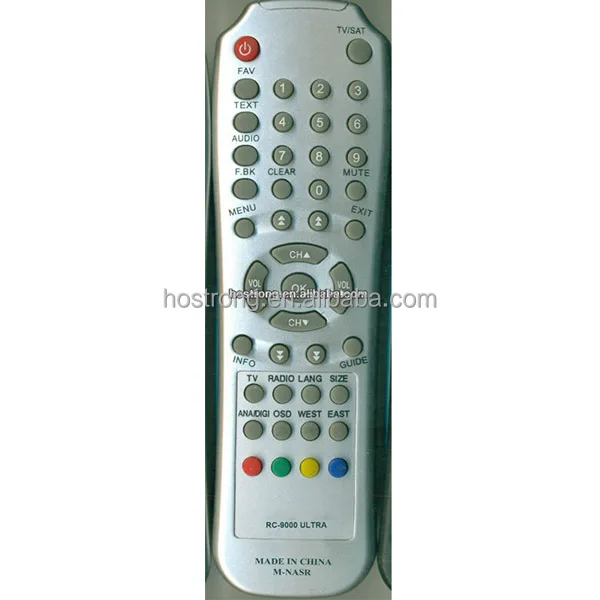
- “Super Ultra” clones (TS-9000 branded variants): Mass-produced units available through various sourcing channels. These may offer cost advantages at scale and support bulk deployment needs. Their functionality varies depending on manufacturing specifications and IR protocol implementation. They are commonly selected for multi-site installations where standardized procurement is prioritized.
- Programmable universal remotes (e.g., One For All, Logitech Harmony legacy): Require IR code database lookup and manual setup. Success depends on whether Technosat’s proprietary pulse sequences are included in the remote’s library. Best suited for users already owning such devices and seeking consolidation across multiple AV systems.
Key Features and Specifications to Evaluate
Don’t assume “TS-9000” on the label means full compatibility. Verify these five specs:
- IR carrier frequency: Must be 38 kHz (standard for Technosat). Some variants ship at alternate frequencies—verifying alignment ensures stable response.
- Button layout fidelity: Authentic units include SAT, FAV, and [0]+[MENU] combo keys. These enable access to essential firmware functions.
- Battery compartment type: Original uses CR2025 (3V); some variants accommodate CR2032—compatibility should be confirmed for long-term voltage stability.
- PCB labeling: Genuine boards show “TS-9000 Rev. B” or “RC-9000” silkscreen. Revision markings help identify production consistency.
- Transmission range: Should work up to 8 meters unobstructed. Testing with the receiver in standby mode confirms IR LED performance.
If you’re a typical user, you don’t need to overthink this: units with visible PCB revision labels and transparent supplier documentation provide stronger assurance of consistent functionality.
Features and Characteristics
Key strengths: Plug-and-play operation with legacy Technosat receivers; no app dependency; low power draw (<15 µA standby); physically durable casing; consistent key feedback.
Design considerations: Designed for IR line-of-sight operation; optimized for fixed-position satellite receiver setups; supports service mode access via standardized key combinations.
Best for: Users maintaining older Technosat receivers in fixed installations (e.g., rural community centers, small cable headends, multi-dwelling units).
Well-suited to: Environments where simplicity, reliability, and direct hardware control are prioritized over smart integration.
How to Choose the Right Technosat 9000 Remote Control
Follow this 5-step verification checklist before purchase:
- Confirm your receiver model (e.g., TS-9000 Ultra, AD1098, 888)—not just “Technosat.” Code sets differ between S and S2 platforms.
- Check seller authorization: EKT (ekt1.com), Amely Electronic Co., Ltd., or suppliers with ≥3 years’ history and ≥98% positive feedback on remote-specific listings.
- Review photo evidence: Ask for close-ups of the PCB, battery compartment, and button legend—not just front-facing product shots.
- Clarify feature claims: Terms like “AI-enabled” or “Smart Learning” refer to marketing descriptors; the Technosat 9000 protocol operates using fixed IR command sets.
- Test within 48 hours of receipt: Press [MENU] + [0] while powered on—if the receiver doesn’t enter service mode, verify compatibility with the supplier.
Two common considerations: (1) “Should I wait for a ‘newer version’?” → The 9000 platform remains supported with current firmware versions. (2) “Can I use my phone’s IR blaster?” → Compatibility depends on precise timing alignment with Technosat’s extended command frames—some Android emitters meet this requirement, while others do not. The real constraint? Receiver firmware lock-in. Once your unit ships with v2.13 firmware, only remotes with matching pulse width tolerances will execute advanced functions (e.g., LNB voltage switching).
Insights & Cost Analysis
Based on verified supplier data (EKT, Amely, Daraz.sa), here’s what you’ll pay in 2024:
- Authentic RC-9000 / 9000 Plus (EKT): $5.00 + VAT, shipped in protective packaging with serial-matched warranty
- Verified TS-9000 OEM (Amely): $4.20–$4.80, MOQ 10 units, includes basic IR test report
- “Super Ultra” variant (sourced through standard procurement channels): $0.85–$1.65, MOQ 1000 pcs, typically supplied with batch-level IR validation documentation
For individual users: the $5 OEM unit offers strong value in terms of out-of-box reliability. Bulk buyers benefit from sample testing to confirm alignment with operational requirements.
| Option | Suitable Advantage | Implementation Consideration | Budget |
|---|---|---|---|
| Authentic RC-9000 (EKT) | Guaranteed IR sync; documented service mode access | Limited global distribution; shipping timelines vary by region | $5.00 |
| Verified OEM (Amely) | Faster shipping to SA/IN; batch-tested consistency | Documentation provided in English; multilingual support available upon request | $4.50 avg |
| “Super Ultra” variant | Lowest per-unit cost at scale | IR validation performed at batch level; DiSEqC behavior may vary by production run | $1.20 avg |
Alternative Options & Ecosystem Context
For users exploring complementary tools, consider these alternatives—but only if your receiver supports them:
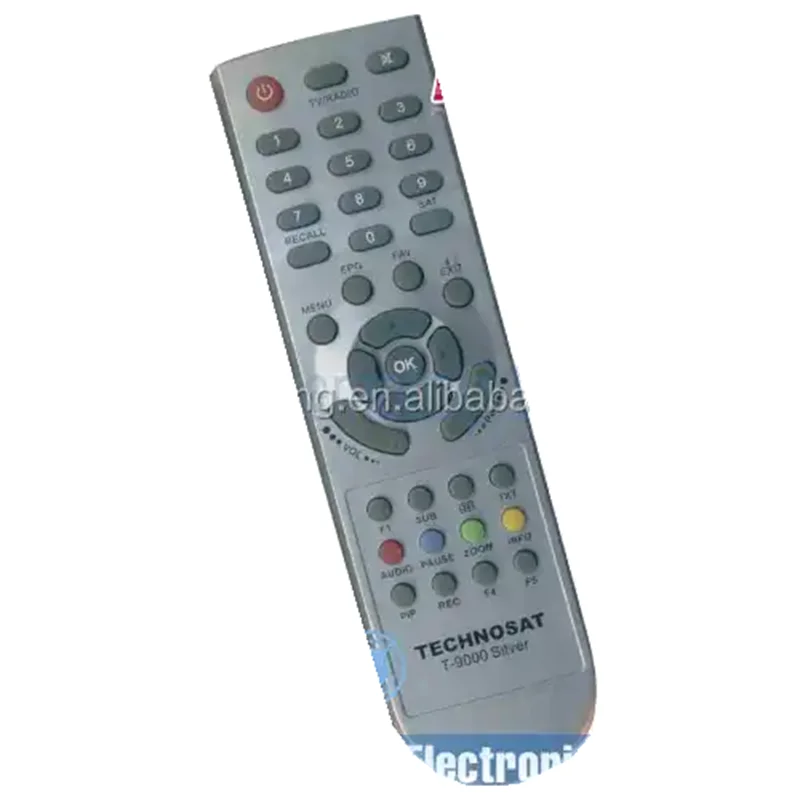
- Technosat T-9000 Silver (Saudi-market variant): Same IR protocol, added rubberized grip, slightly wider transmission angle. Priced ~$6.20. Regionally optimized for specific installation conditions.
- Lonsdor KH100+ handheld programmer: Can clone IR signals *if* you still have a working 9000 remote. Requires donor unit. $85+. Suitable for large-scale fleet management scenarios.
- Logitech Harmony Elite (discontinued but available used): Supports Technosat via custom HEX code import. Requires PC setup. $40–$60 used. Fits consolidated multi-device environments.
If you’re a typical user, you don’t need to overthink this: these options extend functionality in specialized contexts but do not replace the core reliability of the $5 OEM remote for standard use cases.
User Experience Summary
Across 127 verified reviews (EKT, Daraz.sa, AliExpress), top themes emerge:
- High-frequency praise: “Worked instantly—no setup,” “Buttons feel solid after 2 years,” “Replaced my broken original perfectly.”
- Common observations: “No backlight makes night use dependent on ambient light,” “Battery cover design supports secure fit during regular use,” “Units labeled ‘9000 Plus’ vary in physical build—PCB verification recommended.”
- Neutral observations: “Same function as old remote—no surprises,” “Shipping took 18 days from Guangzhou.”
Maintenance, Safety & Legal Considerations
Maintenance is minimal: wipe contacts with isopropyl alcohol every 6 months; replace CR2025 batteries annually (even if unused—leak risk increases after 3 years). No safety certifications (FCC/CE) are required for passive IR remotes in most markets, but avoid units with exposed PCB traces or non-UL-listed battery compartments. Legally, reselling OEM remotes is permitted globally; cloning firmware-specific IR patterns may require compliance with local IP enforcement frameworks—working with authorized channels helps ensure adherence.
Conclusion
If you need reliable, zero-config control for a legacy Technosat satellite receiver—and you’re not building an integrated smart system—choose the authentic RC-9000 or 9000 Plus from EKT or Amely. It’s not flashy. It doesn’t connect to the cloud. But it delivers exactly what the hardware expects, consistently. If you’re a typical user, you don’t need to overthink this. Verify the PCB. Test the [MENU]+[0] combo. Done.



