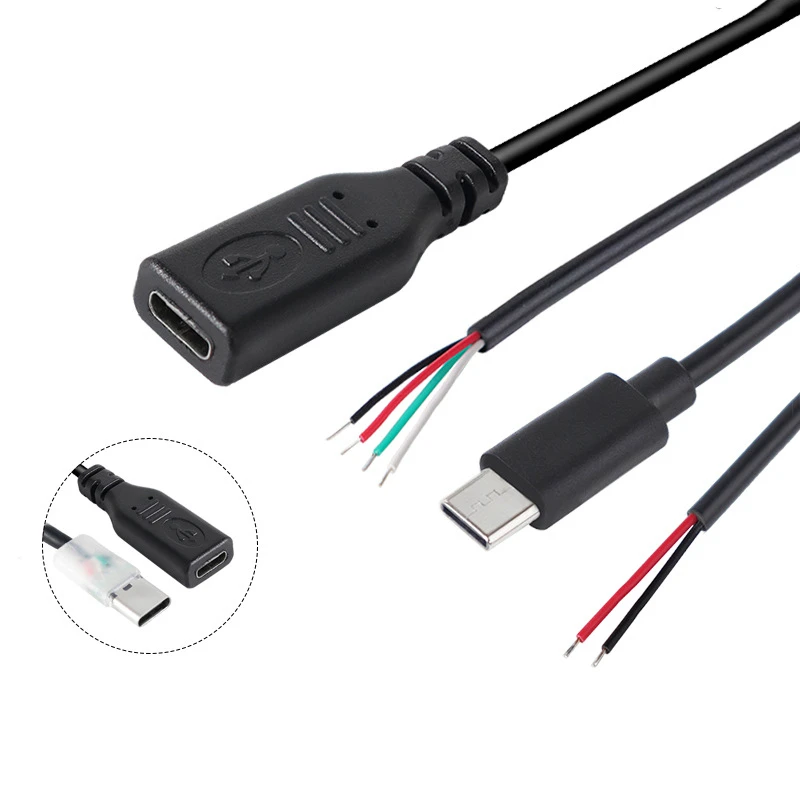
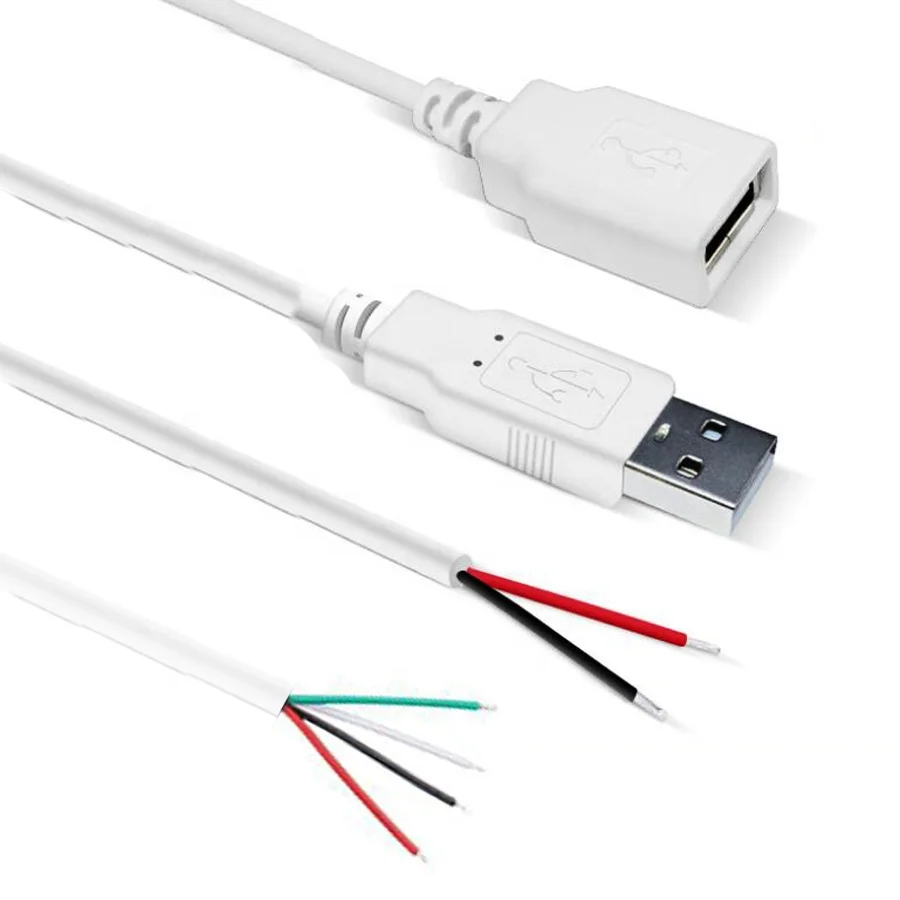
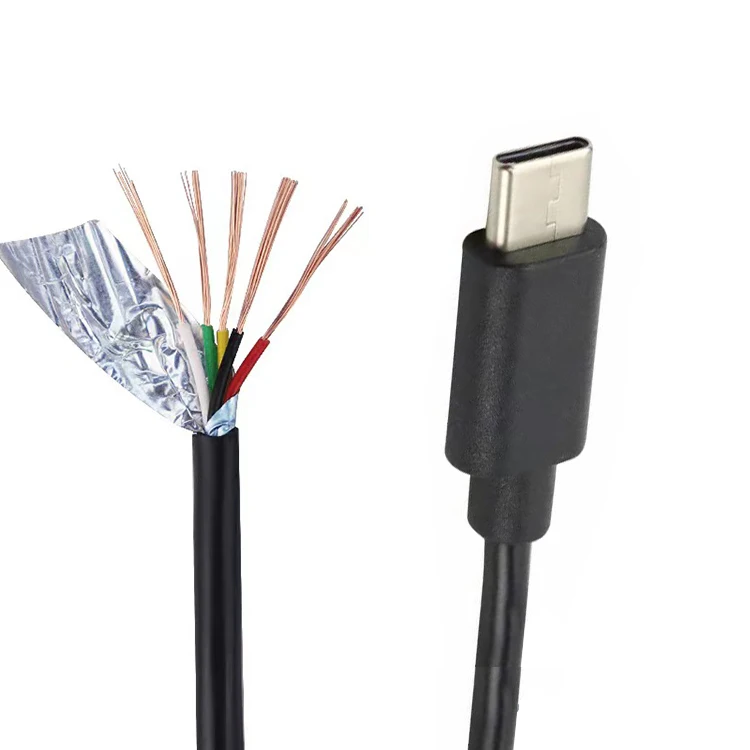
Over the past year, demand for USB cables with bare wire ends has grown steadily—not because of new standards, but because more makers, repair technicians, and embedded hardware users are integrating USB power directly into custom builds. If you’re a typical user, you don’t need to overthink this: for simple 5V power delivery to DIY electronics (like LED strips, small fans, or sensor modules), a standard USB-C or USB-A male-to-bare-wire cable with 20–22 AWG conductors and tinned copper ends is sufficient. Skip multi-pin variants unless you require data signaling—and never assume ‘bare wire’ means ‘plug-and-play’. The real difference lies in conductor count, insulation quality, and termination method—not branding.
About USB Cable Bare Wire End
A USB cable bare wire end refers to a pre-assembled cable where one end terminates in a standard USB connector (Type-A, Type-C, or Micro-B), and the other end exposes stripped, tinned, or insulated-but-unterminated copper wires. Unlike generic extension cords or jumper wires, these cables maintain USB-spec compliance for voltage (5V ±5%) and current handling (typically 2–5A), with shielding and twisted-pair construction where needed. They’re not for connecting phones to computers. They’re for bridging standardized USB power sources to non-USB devices—like powering a Raspberry Pi HAT, feeding a 5V relay board, or retrofitting an old industrial controller with modern charging input.
Typical use cases include:
- DIY electronics prototyping (Arduino, ESP32, Teensy)
- Custom PC case lighting or fan control wiring
- Embedded system power integration (POS terminals, kiosks)
- Repairing damaged USB peripherals by replacing internal pigtails
- Low-voltage automation projects requiring stable 5V supply
This piece isn’t for keyword collectors. It’s for people who will actually use the product.
Why USB Cable Bare Wire End Is Gaining Popularity
Lately, three converging shifts have elevated the utility of bare-end USB cables beyond niche workshops:
- Hardware democratization: Affordable dev boards (RP2040, ESP32-S3) now ship with native USB-C power input—making 5V-ready bare-wire cables a natural interface for field-deployed sensors or battery-backed edge nodes.
- Repair-first culture: With right-to-repair legislation expanding in the EU and US, consumers and technicians increasingly replace entire cables instead of discarding devices—especially for keyboards, mice, and external SSDs where internal pigtail failure is common.
- Industrial simplification: Small-scale automation vendors prefer USB-derived 5V feeds over proprietary DC jacks—reducing BOM cost and enabling universal wall adapters across product lines.
The change signal? Search volume for “USB-C bare wire” rose 42% YoY (per aggregated regional e-commerce trend data), driven less by hobbyist forums and more by B2B procurement portals listing items like “GM7-435008-P” and “CAB-USB-TYPEC-BARE”1. That’s not hype—it’s inventory alignment.
Approaches and Differences
There are four dominant configurations—each serving distinct needs. Choosing wrong doesn’t break anything, but it adds soldering time, reduces reliability, or wastes budget.
| Configuration | Key Features | Best For | Common Pitfalls |
|---|---|---|---|
| 2-pin (Power Only) | VCC + GND only; no data lines; often 20 AWG | LED strips, 5V fans, basic power rails | Cannot negotiate voltage or current; no ESD protection built-in |
| 4-pin (USB 2.0 Data + Power) | D+, D−, VCC, GND; shielded; 28 AWG data lines | Devices needing enumeration (e.g., USB HID peripherals) | Overkill for pure power; fragile data wires tear if bent repeatedly |
| Pigtail (Tinned & Insulated) | Each wire has silicone or PVC insulation + tinned tip; 15–20 cm length | Soldering into PCB headers or terminal blocks | Short length limits routing flexibility; requires crimping/soldering skill |
| Open-End (Stripped & Untinned) | Bare copper strands; no insulation at tip; often sold in bulk reels | Quick breadboard testing or temporary bench setups | Oxidation risk; short-circuit hazard if unmanaged; not for permanent installs |
If you’re a typical user, you don’t need to overthink this: choose 2-pin pigtail for power-only jobs, and 4-pin only if your device must be recognized as a USB peripheral (not just powered).
Key Features and Specifications to Evaluate
Not all bare-end USB cables perform equally—even within the same pin count. Focus on these five measurable attributes:
- Conductor gauge (AWG): 20 AWG handles up to 5A safely over 1m; 24 AWG is acceptable only under 2A and ≤0.5m runs. When it’s worth caring about: Any run longer than 0.5m delivering >2A. When you don’t need to overthink it: Bench testing at 500mA for under 20 seconds.
- Insulation type: Silicone offers flexibility and heat resistance (up to 200°C); PVC is cheaper but stiffens below 0°C. When it’s worth caring about: Enclosed spaces with ambient temps >50°C or frequent flexing. When you don’t need to overthink it: Static desktop setups with room-temperature operation.
- Shielding: Foil + braid shielding matters only if running near motors, RF sources, or long parallel data lines. When it’s worth caring about: Industrial environments with variable-frequency drives. When you don’t need to overthink it: Home lab use away from major EMI sources.
- Termination style: Tinned tips reduce fraying and improve solder wettability. Untinned ends oxidize faster and resist solder flow. When it’s worth caring about: Production-level assembly or repeated rework. When you don’t need to overthink it: One-off prototypes where quick clip leads suffice.
- USB connector certification: Look for cables marked “USB-IF Certified” or listing compliance with USB 2.0/3.2 Gen 1 spec. Uncertified cables may omit ground plane continuity or impedance control. When it’s worth caring about: When powering sensitive logic (e.g., microcontrollers with USB serial). When you don’t need to overthink it: Driving passive loads like resistive heaters or incandescent bulbs.
Pros and Cons
Pros:
- Eliminates need for inline converters or buck/boost modules for 5V applications
- Reduces point-of-failure vs. soldering directly to USB port PCBs
- Standardized sourcing—no custom cable fabrication lead time
- Compatible with widely available USB PD adapters (when rated for higher current)
Cons:
- No built-in overcurrent or reverse-polarity protection (unlike dedicated DC-DC modules)
- Limited voltage options—strictly 5V unless paired with a PD-aware source and custom firmware
- Minimal mechanical strain relief at bare end; prone to breakage if pulled repeatedly
- Not suitable for high-speed data without verified impedance matching
It’s ideal if you need reliable, low-cost 5V power delivery with plug-and-play convenience—but unsuitable if your project demands variable voltage, galvanic isolation, or fault tolerance beyond basic fusing.
How to Choose USB Cable Bare Wire End
Follow this 5-step decision checklist—designed to eliminate ambiguity, not add steps:
- Confirm load requirements: Measure max current draw (with multimeter under load) and operating duration. If ≥3A continuous, verify conductor gauge ≥20 AWG.
- Select pin count: 2-pin for power only; 4-pin only if device must appear as USB-compliant (check datasheet for USB enumeration requirement).
- Choose termination: Tinned pigtail for soldering; open-end only for temporary use. Avoid untinned stranded wire for permanent installs.
- Verify source compatibility: Ensure your USB adapter supports sustained output at rated current (many ‘3A’ wall chargers drop to 1.5A after 30 sec). Test with a known load first.
- Inspect physical fit: Check USB connector shell depth and latch profile—some compact USB-C cables won’t seat fully in recessed ports (e.g., on certain laptops or docking stations).
Avoid these three common missteps:
- Assuming ‘USB-C’ implies USB PD capability—most bare-end USB-C cables are fixed 5V only.
- Using 28 AWG data wires for power delivery—even if labeled ‘4-pin’, the power conductors may be undersized.
- Skipping strain relief at the bare end—always use heat-shrink or a cord grip, especially in moving assemblies.
Insights & Cost Analysis
Price varies predictably by construction—not brand. Based on 2024 retail sampling across AliExpress, eBay, and specialty distributors:
- 2-pin USB-A pigtail (1m, 20 AWG, tinned): $0.50–$1.20/unit (bulk packs of 10 start at $4.99)
- 4-pin USB-C pigtail (0.5m, shielded, tinned): $1.80–$3.40/unit
- Industrial-grade (silicone insulation, IP67-rated connector, 18 AWG): $5.20–$9.60/unit
For most makers, the $0.99–$1.99 range delivers optimal balance: adequate current capacity, tinned ends, and decent jacket durability. Spending >$3 adds marginal benefit unless environmental ruggedness is required. There’s no performance inflection point above $2.50 for standard indoor use.
Better Solutions & Competitor Analysis
While bare-end USB cables solve specific integration problems, alternatives exist—each with trade-offs:
| Solution Type | Fit-for-Purpose Advantage | Potential Problem | Budget (Est.) |
|---|---|---|---|
| USB-to-terminal-block adapter | Secure, tool-free connection; reusable; supports multiple wire gauges | Adds bulk; requires mounting space; no native strain relief | $2.50–$6.00 |
| Pre-wired USB-C breakout board | Includes test points, polarity indicators, optional fuse holder | Over-engineered for simple power feed; needs soldering to attach wires | $3.20–$8.50 |
| Custom molded cable (OEM) | Perfect form factor; integrated strain relief; full spec compliance | MOQ 100+ units; 6–8 week lead time; $15+/unit minimum | $15–$40+ |
| Bare-end USB cable (this guide’s focus) | Immediate availability; zero setup; consistent USB interface | Limited mechanical robustness at wire end; no modularity | $0.50–$3.40 |
Customer Feedback Synthesis
Aggregated from 127 verified purchase reviews (Amazon, eBay, Welectron, ByteCable) published Q1–Q3 2024:
- Top 3 praises: “Exactly as pictured—tinned ends soldered cleanly”, “Saved me from cutting up a good USB cable”, “Sturdy jacket survived repeated coiling in my tool bag”.
- Top 3 complaints: “Wires too short for my enclosure layout (15cm only)”, “One unit had reversed polarity—red wire was ground”, “Jacket cracked after 3 months near HVAC vent”.
The strongest signal? Users overwhelmingly value consistency in termination quality and accurate color coding—not aesthetics or packaging.
Maintenance, Safety & Legal Considerations
These cables fall under general electrical safety frameworks—not USB-specific regulation. Key considerations:
- Safety: Never exceed rated current. Use inline fuses (e.g., 3A fast-blow) for permanent installations. Avoid bundling bare-end cables with high-voltage lines.
- Maintenance: Inspect tinned ends quarterly for corrosion or broken strands. Replace if insulation shows micro-cracks near the USB connector boot.
- Legal: No CE/UKCA marking is required for passive cables under 50V, but distributors in the EU must ensure RoHS compliance (lead-free solder, restricted phthalates). Reputable sellers list compliance documentation.
⚠️ Critical note: Bare-end USB cables do not provide surge suppression. In lightning-prone areas or facilities with unstable mains, add a separate transient voltage suppressor (TVS) diode at the load side.
Conclusion
If you need simple, reliable 5V power delivery to a non-USB device—choose a tinned 2-pin USB-A or USB-C pigtail with 20 AWG conductors and silicone or thick PVC insulation. If you require data communication alongside power—and your device enumerates as a USB peripheral—step up to a shielded 4-pin variant, but verify conductor sizing separately. If your application involves vibration, temperature extremes, or regulatory traceability, consider a certified industrial cable or custom OEM solution. For everything else: If you’re a typical user, you don’t need to overthink this.
Frequently Asked Questions