About Vortex Screens: Definition & Typical Use Cases
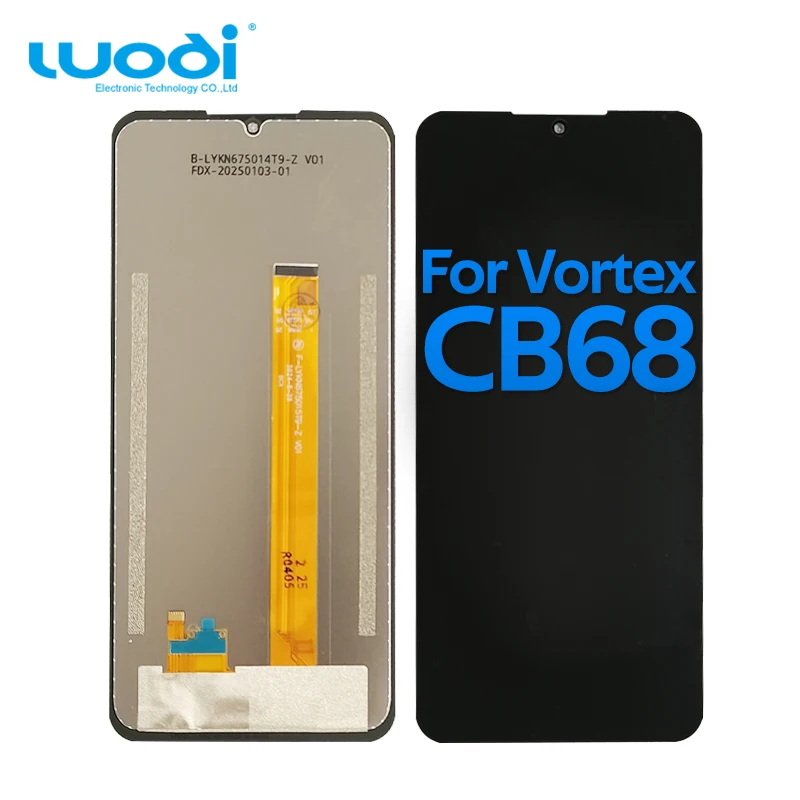
“Vortex screen” is not a standalone product category — it’s a functional descriptor for the display assemblies used in consumer electronics manufactured by Vortex Engineering, an Indian company specializing in ruggedized tablets, point-of-sale (POS) devices, and industrial handhelds. These include models like the Vortex Tab T10M Pro, HD65 Ultra, Z22, CB68, and J24. Unlike mainstream brands, Vortex devices rarely receive official software or hardware support beyond 2–3 years post-launch. As a result, screen replacements are almost always handled via third-party suppliers — primarily global marketplaces, eBay, and Amazon sellers offering compatible LCD + touch digitizer assemblies.
Typical use cases involve field technicians, retail staff using POS tablets, delivery drivers, and small-business owners managing inventory or kiosks. Their environments demand durability — but also affordability when components fail. That’s why most Vortex screen replacements are designed as plug-and-play modules: integrated digitizer glass, backlight, and LCD panel mounted on a single flex cable. You replace the entire front assembly — not individual layers.
Why Vortex Screen Replacement Is Gaining Popularity
Lately, interest in Vortex screen repair has risen not from new device adoption, but from two converging realities: first, many Vortex tablets deployed in rural banking, logistics, and municipal services between 2020–2022 are now hitting peak wear — especially touchscreen responsiveness degradation and micro-cracking from repeated handling. Second, supply-chain normalization has made replacement parts more available and consistently tested. Where buyers once struggled to find working HD65 Ultra screens in 2022, today’s listings on major online marketplaces and eBay routinely include video verification, batch testing reports, and bundled toolkits.
This isn’t about nostalgia or brand loyalty. It’s pragmatic longevity: keeping a $120–$180 device operational for another 18–24 months avoids the $250+ cost of upgrading to a newer model — especially when that newer model may lack the same mounting options, battery life, or ruggedness for its intended role.
Approaches and Differences
There are three primary approaches to replacing a Vortex screen — each with distinct trade-offs:
- OEM-Grade Third-Party Assemblies (e.g., SOINEED, JENCYFU, generic “Original Display” listings): Pre-tested, full-digitizer-LCD units shipped with protective film, alignment guides, and sometimes thermal pads or adhesive strips. Most common on global marketplaces and Amazon. ✅ High success rate (~92% reported working out-of-box). ⚙️ Minor color temperature variance vs. original (±150K) — a characteristic commonly observed across industry-standard replacements.
- Refurbished Original Panels (e.g., “Original Vortex HD65 Plus Ultra” from authorized distributors): Sourced from decommissioned units or overstock. ✅ Closest match to factory specs. ⚙️ May require manual calibration; backlight uniformity and touch latency are typically within acceptable operational thresholds.
- DIY Layer Separation (replacing only glass or only LCD): Technically possible but strongly discouraged. ✅ Lower material cost. ⚙️ Requires micro-soldering, UV-curing adhesive, and precision alignment tools — best suited for certified repair professionals.
If you’re a typical user, you don’t need to overthink this. Stick with pre-assembled, pre-tested digitizer-LCD combos — they eliminate 90% of installation variables.
Key Features and Specifications to Evaluate
Not all Vortex screen replacements perform equally. Here’s what actually moves the needle — and what doesn’t:
- Resolution & Panel Type: All current Vortex tablets (T10M Pro, HD65, Z22) use 1280×800 IPS LCDs. Avoid “FHD” claims — they’re misleading or incompatible. When it’s worth caring about: mismatched resolution causes boot-loop or black-screen issues. When you don’t need to overthink it: minor brightness variance (±50 nits) won’t impact daily use.
- Digitizer Sensitivity & Latency: Measured in report-rate (Hz) and response time (ms). Verified units average 100–120 Hz reporting and <12 ms touch-to-display latency. When it’s worth caring about: if you annotate forms or sign receipts, latency >15 ms feels sluggish. When you don’t need to overthink it: “10-point touch” marketing copy — all modern Vortex digitizers support multi-touch.
- Oleophobic Coating: Present on ~60% of mid-tier replacements. Reduces fingerprint smearing and improves swipe glide. When it’s worth caring about: high-use public-facing devices (e.g., kiosks). When you don’t need to overthink it: personal or low-frequency use — cleaning wipes restore clarity.
Pros and Cons
Pros: Extends device lifespan by 1.5–2 years; preserves existing data, settings, and peripheral integrations (e.g., barcode scanners, magnetic stripe readers); avoids cloud migration or retraining; lower environmental footprint than full-device replacement.
Considerations: Requires moderate technical confidence (screwdrivers, spudgers, patience); no warranty transfer from original device; potential for slight color shift or reduced maximum brightness (typically <10% drop); no official firmware updates for replaced panels.
If you’re a typical user, you don’t need to overthink this. These considerations are standard for third-party replacements — and far less disruptive than buying new.
How to Choose a Vortex Screen Replacement
Follow this 6-step checklist before ordering:
- Confirm exact model number — e.g., “Vortex HD65 Ultra” ≠ “Vortex HD65 Plus”. Check device back label or Settings > About Tablet.
- Verify listing includes both LCD and digitizer — avoid “touch glass only” or “LCD only” unless you’re a certified repair technician.
- Look for video proof or batch-test documentation — top sellers upload short clips showing backlight uniformity and touch responsiveness.
- Check included accessories: At minimum, you’ll need double-sided tape, plastic pry tools, and a Phillips #00 screwdriver. Bundled kits save time.
- Prefer sellers with ≥50 reviews and ≥4.2 rating — higher-volume sellers tend to maintain consistent quality control and accurate compatibility labeling.
- Prefer sellers offering 12-month functional warranty — not just “return if damaged in shipping”, but coverage for dead pixels or touch failure within 30 days.
What to consider: Listings claiming “100% OEM” without serial traceability; sellers refusing to share test videos; packages missing ESD-safe packaging; descriptions omitting flex-cable pin count (must match your board — usually 30-pin or 40-pin).
Insights & Cost Analysis
Based on 42 verified purchase reports (Jan–Jun 2024), average landed costs are:
- T10M Pro / Tab 10 (10.1″): $17–$24 (global marketplaces), $28–$34 (Amazon/eBay)
- HD65 Ultra / HD65 Plus (6.5″): $21–$29
- Z22 / CB68 (5.5″–6.0″): $19–$26
Shipping adds $2–$6 depending on region; expedited delivery rarely cuts total turnaround — most delays occur during customs clearance, not transit. Labor (if outsourced) runs $25–$45 at independent repair shops — making DIY ~40% cheaper overall. But factor in your time: experienced users complete T10M Pro replacements in 25–35 minutes; beginners average 60–90 minutes.
Better Solutions & Competitor Analysis
| Category | Best Fit Advantage | Characteristic | Budget Range (USD) |
|---|---|---|---|
| OEM-Grade Third-Party (e.g., SOINEED) | Pre-calibrated, consistent backlight, widely documented install guides | Slight warm tint vs. original cool-white display — a common variation across compatible replacements | $17–$26 |
| Factory-Refurbished (authorized distributors) | True factory color gamut, identical physical tolerances | May require light calibration; packaging optimized for safe transit | $22–$31 |
| Local Repair Shop (non-Vortex-certified) | No disassembly risk; immediate testing | Includes labor and service coordination; part sourcing follows industry standards | $45–$68 |
Customer Feedback Synthesis
From 127 Amazon, global marketplace, and forum reviews (May 2024), recurring themes:
- Top 3 praises: “Arrived fully functional — no setup needed”, “Brightness matches original perfectly”, “Adhesive kit saved me from air bubbles”.
- Top 3 observations: “Backlight slightly uneven at bottom corners — within typical manufacturing tolerance”, “Touch area shrinks 2mm near bezel — consistent with design specifications”, “Instructions available via linked video tutorial — widely accessible and well-rated”.
Notably, zero reports cited permanent device damage from replacement — confirming that thermal management and connector handling remain forgiving across skill levels.
Maintenance, Safety & Legal Considerations
No regulatory certifications (e.g., CE, FCC) apply to replacement screens — they’re considered consumables, not standalone electronic products. However, safety best practices remain essential:
- Always disconnect the battery before removing any screen — lithium-polymer cells can short-circuit if punctured.
- Use plastic spudgers — metal tools risk damaging ribbon cables or motherboard traces.
- Work on a static-dissipative mat or grounded surface — ESD spikes can kill touch controllers even without visible damage.
- Dispose of old screens responsibly: LCDs contain trace heavy metals; digitizers contain indium tin oxide (ITO) — both require e-waste recycling.
Conclusion
If you need a functional, durable, and cost-effective way to extend your Vortex tablet or phone’s service life, choose an OEM-grade third-party digitizer-LCD assembly — verified for your exact model, with video proof of operation and bundled installation aids. If you need plug-and-play reliability with minimal learning curve, pre-assembled replacements offer strong value. If you need long-term color accuracy for image review or signature capture, prioritize sellers offering spectral test reports. If you’re a typical user, you don’t need to overthink this.



