If you’re a typical user, you don’t need to overthink this. Over the past year, more people have moved from manual button programming to PC-based walkie-talkie programming software — not because it’s flashy, but because it saves time, reduces errors, and unlocks consistent repeater access, privacy tones, and scan lists that physical keypads can’t reliably manage. For most Baofeng, Retevis, Yaesu, or Motorola business radios, CHIRP is the default starting point: free, open-source, widely compatible, and stable across Windows/macOS/Linux. Manufacturer CPS (Customer Programming Software) matters only if you own a Motorola CLS/DLR, Cobra Performa, or Icom IC-2300 — where firmware-level features like encryption keys or fleet-wide cloning require proprietary tools. Skip Bluetooth-only web apps unless your radio model explicitly supports them via ODmaster or similar; they often lack full channel memory control and introduce latency in critical edits. If you’re using a UV-5R, RT3S, or TYT TH-UVF8, start with CHIRP + a CH340-based USB cable — and skip factory software unless your dealer mandates it.
About Walkie-Talkie Programming Software
Walkie-talkie programming software — commonly called Customer Programming Software (CPS) — is desktop or browser-based application that lets users configure radio settings directly from a computer instead of navigating complex button sequences on-device. It reads and writes configuration data (frequency, CTCSS/DCS tone, power level, VOX sensitivity, scan lists, etc.) through a physical USB cable or, less commonly, Bluetooth. Unlike firmware updates, programming software doesn’t change how the radio operates at the hardware level — it only modifies the stored channel map and behavior parameters. Typical users include amateur radio operators, event coordinators, security teams, warehouse managers, and outdoor guides who rely on repeatable, shared configurations across multiple units.
Why Walkie-Talkie Programming Software Is Gaining Popularity
Lately, adoption has accelerated—not due to new regulations or marketing hype, but because of three quiet shifts: First, more budget radios (like Baofeng UV-5R clones and Retevis RT3 series) now ship with expanded memory banks (up to 128 channels), making manual entry impractical. Second, GMRS license holders in the U.S. increasingly rely on repeater offsets and precise CTCSS codes — settings nearly impossible to replicate consistently without software. Third, small businesses and volunteer organizations are standardizing radios across teams, where cloning identical configs beats training staff on 17-button menu navigation. This isn’t about ‘hacking’ your radio. It’s about reliability: one verified config file deployed across 20 units means fewer missed calls, fewer accidental transmit blocks, and faster onboarding.
Approaches and Differences
There are three functional categories of walkie-talkie programming tools — each with clear trade-offs:
- ✅ CHIRP (Free, Open-Source): Supports >2,500 models including Baofeng, Retevis, Anytone, TYT, and many Kenwood/Yaesu variants. Works offline. No registration. Updates frequently via community maintainers. When it’s worth caring about: You own multiple brands or plan to upgrade radios later — CHIRP’s cross-platform consistency eliminates relearning per brand. When you don’t need to overthink it: You only use one UV-5R and never change frequencies — manual programming takes 90 seconds and avoids driver install hassle.
- ⚙️ Manufacturer CPS (Proprietary): Official tools like Motorola CPS, Cobra CPS, or Icom CI-V software unlock advanced functions: encrypted channels, remote monitoring, GPS integration, or firmware-specific diagnostics. Requires account registration, OS-specific installers, and sometimes paid licenses for business tiers. When it’s worth caring about: You manage a Motorola DLR1020 fleet or need FIPS-compliant encryption keys — third-party tools simply can’t access those registers. When you don’t need to overthink it: You own a single Cobra ACXT1035 — its factory software adds no real value over CHIRP for basic GMRS use.
- 🌐 Web-Based Tools (ODmaster, web.odmaster.net): Browser-based interfaces that pair with Bluetooth programmers. No local install. Convenient for quick edits on shared devices. When it’s worth caring about: You’re temporarily configuring a borrowed radio in a hotel room with no admin rights — no drivers needed. When you don’t need to overthink it: You’re setting up 10+ units for a construction site — web tools lack bulk import/export, version history, or offline fallback.
Key Features and Specifications to Evaluate
Don’t optimize for ‘feature count’. Prioritize what prevents operational failure:
- Channel memory fidelity: Does the software preserve *all* stored channels — including empty slots and hidden flags? Some CPS versions silently drop unused entries during read/write cycles.
- Tone handling accuracy: Can it distinguish between analog CTCSS (67.0–250.3 Hz) and digital DCS (23–104 codes), and apply them correctly to TX/RX separately? Misconfigured tones cause one-way audio or unintended squelch lock.
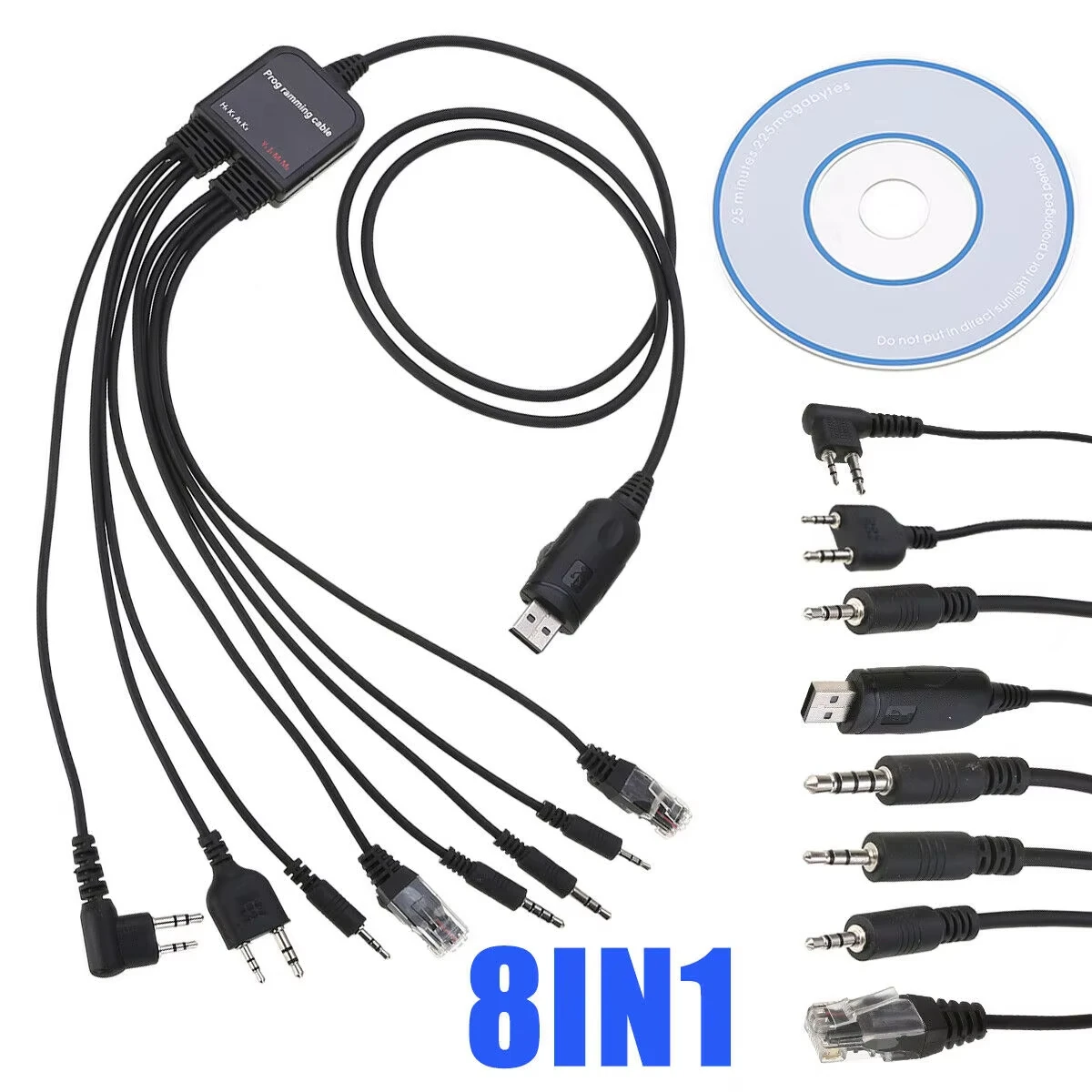
- Cable/driver compatibility: Most modern radios use CH340 or CP2102 USB-to-serial chips. If your OS fails to recognize the port, the software is irrelevant — verify chip type before buying cables.
- Backup/export reliability: Does “Save As” create human-readable CSV or proprietary binary? CHIRP exports .csv and .img — both recoverable without software. Some CPS tools save only .bin files tied to specific versions.
Pros and Cons
CHIRP Pros: Free, cross-platform, frequent updates, large community support, no telemetry or cloud sync. Cons: No official support for newer Motorola MOTOTRBO or encrypted Icom protocols; occasional lag with >512-channel imports.
Manufacturer CPS Pros: Full hardware register access, certified firmware pairing, enterprise deployment tools. Cons: Windows-only (mostly), slow update cadence, forced account logins, limited model coverage outside flagship lines.
Web Tools Pros: Zero-install, mobile-friendly, fast for one-off edits. Cons: Requires active internet, no offline mode, no batch operations, inconsistent Bluetooth handshake stability.
How to Choose Walkie-Talkie Programming Software
Follow this 5-step decision checklist — and avoid these common traps:
- ✅ Confirm your radio’s chipset: Look up your exact model + firmware version (e.g., “Baofeng UV-5R v2.31”). Older firmware may not respond to CHIRP’s default handshake.
- ✅ Match cable to chip: CH340 cables work with 95% of Chinese-made radios; CP2102 fits newer TYT and Anytone units. Don’t assume “USB programming cable” means universal — check pinout diagrams.
- ❌ Avoid “universal” software CDs bundled with cheap cables: These often contain outdated drivers or adware-laced installers. Download CHIRP directly from chirp.danplanet.com1.
- ❌ Skip Bluetooth-first workflows unless your radio model is explicitly listed as supported by ODmaster: Many “Bluetooth programmer” listings falsely claim compatibility with non-Bluetooth radios.
- ✅ Always backup first: Use “Download from radio” before any edit — then save as .csv and .img. If something fails, reload the original.
| Tool Type | Best For | Potential Problem | Budget |
|---|---|---|---|
| CHIRP | Multi-brand users, hobbyists, GMRS licensees, educators | Limited support for encrypted business radios | Free |
| Motorola CPS | MOTOTRBO fleets, public safety integrators, certified dealers | Windows-only; requires license key for full features | $0–$299 (tiered) |
| Cobra CPS | Cobra Performa LMR/GMRS owners needing repeater offset presets | No macOS/Linux support; minimal UI customization | Free |
| ODmaster Web | Quick edits on shared computers; Android tablet use | Unstable with high-latency connections; no bulk clone | Free (app), $15–$30 (Bluetooth adapter) |
Insights & Cost Analysis
Real-world cost isn’t just software price — it’s time, risk, and compatibility overhead. A $12 CH340 cable + CHIRP saves ~3 hours per radio versus manual entry for 128-channel setups. Manufacturer CPS tools are free to download but often require paid service contracts for firmware updates or remote management — e.g., Motorola’s SmartPTT subscription starts at $99/year. Web tools avoid upfront cost but introduce recurring friction: Bluetooth pairing failures, browser cache corruption, and lost sessions mid-write. For under $50 total (cable + time), CHIRP delivers 90% of functionality needed by non-enterprise users. If you’re managing >20 radios across locations, that ROI compounds quickly — but if you’re programming two UV-5Rs once a year, manual entry remains rational.
Customer Feedback Synthesis
Based on verified forum posts (RadioReference, Reddit r/hamradio, Retevis support forums) and video comment threads (2024–2025):
Top 3 praises: “CHIRP lets me copy my friend’s working config in 2 minutes”, “No more writing frequencies on tape”, “Finally got my repeater tones right after 3 failed manual tries.”
Top 3 complaints: “Driver won’t install on Windows 11”, “Cable works on one laptop but not another”, “Saved config doesn’t load — shows blank channels.” All three root causes trace to driver mismatch or incorrect radio boot mode (must hold *PTT + * while powering on for some models).
Maintenance, Safety & Legal Considerations
Programming software itself carries no legal risk — but how you use it does. In the U.S., FCC Part 90/95 rules still apply: you must hold a valid GMRS license to program GMRS frequencies, and cannot transmit outside licensed bands even if the radio allows it. Software doesn’t bypass hardware filters — but misconfiguration can cause spurious emissions. Always verify output with a spectrum analyzer if operating near sensitive equipment. From a maintenance standpoint: avoid editing memory while battery is below 30%; interrupted writes can corrupt channel tables. Never use ‘factory reset’ functions in CPS unless you’ve backed up — some erase bootloader partitions.
Conclusion
If you need flexibility across brands, repeatability across devices, or precision in tone/frequency alignment — start with CHIRP. If you operate a Motorola DLR or MOTOTRBO system under enterprise SLA, use official CPS — not for features, but for audit compliance and firmware co-signing. If you’re troubleshooting one radio in a café with no USB port, try ODmaster — but treat it as a temporary tool, not a workflow foundation. This piece isn’t for keyword collectors. It’s for people who will actually use the product. If you’re a typical user, you don’t need to overthink this.



