Mouse Rolling

Overview
Product sourcing insights & recommendations
The term "mouse rolling" identifies two distinct market segments: premium ergonomic office peripherals (specifically the RollerMouse brand) and interactive smart pet toys.
1. Ergonomic Office Segment: RollerMouse
The RollerMouse by Contour Design is a high-end alternative to traditional mice, featuring a central "rollerbar" that controls the cursor through sliding and rolling motions ContourdesignContourdesign.
- Market Trends: Increasing focus on health-centric workstations as remote and hybrid work persists through 2026 Sourceready. Users are shifting toward centered designs to reduce repetitive strain injuries (RSI) Contourdesign.
- Pricing & Sourcing: Units typically range from $270 to over $490 for high-spec models with arm support PcmagAlibaba. Manufacturers are primarily specialized electronic factories in China and ergonomic designers in Europe .
- Limitations: While excellent for standard office productivity, they are explicitly not recommended for precision design work (CAD/Photoshop) or competitive gaming Pcmag.
2. Pet & Kids' Toy Segment: Automatic Rolling Mouse
Interactive toys that roll autonomously are a high-growth category driven by the "humanization of pets" trend and demand for screen-free educational play ToyassociationWunderkids.
- Market Trends: The smart pet toy market is projected to grow significantly as owners seek automated exercise solutions Hktdc. Features like obstacle avoidance, USB charging, and "smart sensing" electric motion are now industry standards AlibabaAlibaba.
- Pricing & Sourcing: Wholesale prices are highly competitive, ranging from $0.96 to $14.39/unit depending on robotic complexity AlibabaAlibaba. Sourcing is dominated by toy-tech hubs like Shantou and Shenzhen AlibabaAlibaba.
Here are the product and market findings for 'mouse rolling'. You can continue with:
Ergonomic Rollermouse For Office Work
Products · 2 lists
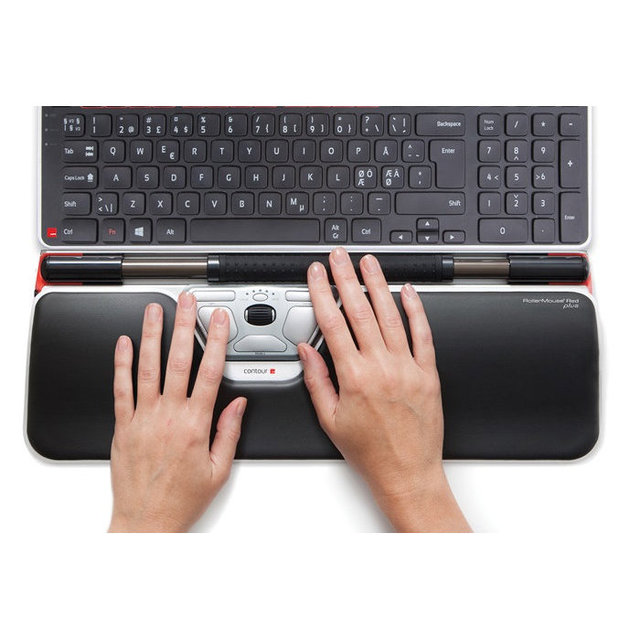
RollerMouse RM-RED-MAX with ArmSupport
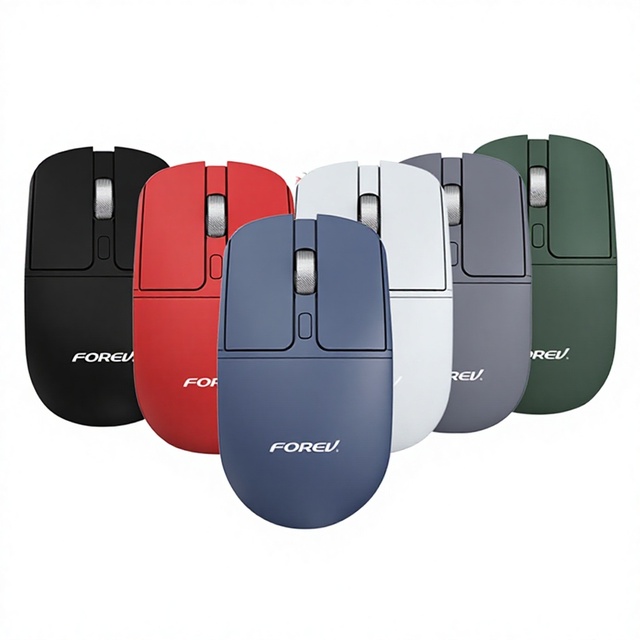
FV-386 Wireless Silent Metal Roller Mouse USB Optical Sensor Ergonomic Design 24G + for Dual Mode Compatible Laptops
Related Searches
Explore more sourcing topics & related categories
Sources & References
26 sources cited · Verified industry data & reports
Trackball - Wikipedia
en.wikipedia.org
A trackball is a pointing device consisting of a ball held by a socket containing sensors to detect a rotation of the ball about two axes—like an upside-down ball mouse with an exposed protruding ball. Users roll the ball to position the on-screen pointer, using their thumb, fingers, or the palm of the hand, while using the fingertips to press the buttons. With an LED for illumination from one side and an optical sensor on the other, rotation of the wheel periodically blocks and unblocks the light, so the sensor produces electrical pulses to indicate that rotation is occurring. Mice used the same basic system for determining motion, but had the problem that the ball was in contact with the desk or mousepad. In order to provide smooth motion the balls were often covered with an anti-slip surface treatment, which was, by design, sticky. Rolling the mouse tended to pick up any dirt and drag it into the system where it would clog the chopper wheels, demanding cleanup. With most trackballs, operators have to lift their finger, thumb or hand and reposition it on the ball to continue rolling, whereas a mouse would have to be lifted itself and re-positioned. Some trackballs have notably low friction, as well as being made of a dense material such as phenolic resin, so they can be spun to make them coast. This trackball was called Rollkugel (German for "rolling ball"). Somewhat later, the idea of "reversing" this device led to the introduction of the first computer ball mouse (still named Rollkugel, model RKS 100-86), which was offered as an alternative input device to light pens and trackballs for Telefunken's computer systems since 1968. Benjamin felt that a more elegant input device was needed and invented a ball tracker system called the roller ball for this purpose in 1946. The device was patented in 1947, but only a prototype using a metal ball rolling on two rubber-coated wheels was ever built and the device was kept as a military secret. Production versions of the CDS used joysticks.
RollerMouse Collection – Ergonomic Mouse for Pain-Free Work
www.contourdesign.com
RollerMouse is our answer to computing pain. It's a comfy mouse alternative that keeps your neck, shoulder, forearm and wrists happy and your work flowing. Let's change that!Shop our products · Oops! Something went wrong while submitting the form. ... The first ergonomic touchpad. ... Pain-free precision every day. ... All-day ease and personalized comfort. ... Control meets comfort in every precise click. ... Typing that feels natural and pain-free. ... Makes editing simple, comfortable, and fast. ... Pair up for better, more efficient workflows. ... Level up your desk with smart, useful add-ons. ... RollerMouse delivers effortless control and all-day comfort—right at your fingertips. So, we created RollerMouse—a smarter, more natural way to work. It’s about keeping you comfortable and in control, no matter how long your day gets. Say goodbye to strain. We design for your body’s natural movement. We reinvented the mouse to reinvent your workday. RollerMouse adapts to your hands, so you can work smarter, longer, and pain-free.
Scroll wheel - Wikipedia
en.wikipedia.org
Some user interfaces, like Cinnamon, allow using it to adjust brightness and volume by pointing at the respective taskbar icon and rolling the wheel. Spinners and drop-down lists in most toolkits also allow adjustment of the value using mouse wheel. The scroll wheel on a mouse has been invented multiple times by different people unaware of the others' work. Other scrolling controls on a mouse, and the use of a wheel for scrolling both precede the combination of wheel and mouse. The earliest known example of the former is the Mighty Mouse prototype developed jointly by NTT, Japan and ETH Zürich, Switzerland (Kunio Ōno, Ken'ichi Fukaya and Jürg Nievergelt) in 1985. rolling the wheel from the top side to the bottom, is known as scrolling "downward" or "backward". In a graphical user interface, the "upward" motion moves contents of the window downward (and the scrollbar thumb, if present, upward), and vice versa. In other configurations (sometimes called "natural scrolling") the effect is inverted. On most mice, the scroll wheel can often also be used as a third, middle mouse button by pressing down on it, known as the scroll button. A scroll wheel is a wheel used for scrolling on an electronic visual display. The term usually refers to a wheel found on a computer mouse, in which case it is also called a mouse wheel. It is often made of hard plastic with a rubbery surface, centred around an internal rotary encoder. Some mice's scroll wheels can scroll horizontally by tilting them to the left or right, or there may be additional wheel on a perpendicular axis located elsewhere on the mouse. The wheel is often, but not always, engineered with detents to turn in discrete steps, rather than continuously as an analog axis, to allow the operator to more easily intuit how far they are scrolling.
Rolling Mouse - Best Buy
www.bestbuy.com
Most rolling mice are designed to work on a variety of surfaces, including mouse pads, desks, and even some fabric surfaces. For optimal performance, a smooth, flat surface is recommended. Are rolling mice compatible with both Windows and Mac computers? Yes, most rolling mice are universally compatible with both Windows and Mac operating systems. Always check the product specifications to ensure compatibility with your specific device. Shop rolling mice at Best Buy for smooth, precise control. Find wired and wireless options to enhance your computer experience. Works great love the products at best buy all the time...GREAT SALE PRICE. I LIKE BEST BUY. A wireless pale gray mouse featuring ambidextrous design, micro-precise scrolling, and up to 18-month battery life. What is the difference between a rolling mouse and a traditional mouse?
Contour Design RollerMouse Red Review: A Pricey, Comfy Alterna-Mouse ...
www.pcmag.com
Then I’m probably dreaming about all those cool products.) I’ve covered the consumer tech world as an editor, reporter, and analyst since 2015. ... Trained exclusively on our massive library of expert buying advice, finding the right tech to fit your life has never been easier. ... Read Our Editorial Mission Statement and Testing Methodologies. The RollerMouse Red replaces your traditional mouse with a centered "roller bar" designed to reduce shoulder and wrist strain. The RollerMouse Red replaces your traditional mouse with a centered "roller bar" designed to reduce shoulder and wrist strain. For heavy typists or office workers dealing with discomfort, it could be a game-changer, but it's expensive. The RollerMouse Red (starts at $374) is a striking device. Instead of sitting off to the side of your keyboard like a traditional computer mouse does, this input tool lives directly in front of it, where your wrist rest would normally go. The signature feature is a 7-inch roller bar that tracks horizontal movement and acts as a clickable button. The roller bar glides effortlessly, and once you dial in your preferred DPI setting, it's easy to control across single- or dual-monitor setups. However, the device is not well-suited for precision work. We found it difficult to control fine cursor movement in Photoshop, Illustrator, and similar apps. If your daily workflow includes design, CAD, or gaming, this won't replace your go-to mouse.
Computer Mouse Roller Ball: A Complete Buyer's Guide
www.contourdesign.com
Your cart is empty. Let's change that!Shop our products · Oops! Something went wrong while submitting the form. ... If you've spent years grinding through 8-hour workdays with a standard mouse, your wrists already know the story. The ache that starts around 3 p.m. The forearm tension that lingers into the evening. The quiet worry that things might be getting worse. A computer mouse roller ball, more commonly called a trackball, offers a fundamentally different way to control your cursor. What is a computer mouse roller ball and how does it work? Discover who benefits most, how it compares to standard mice, and whether it suits your work style. For a broader overview, start with our guide to the best ergonomic mouse. But is it actually the right fix for your setup? That depends on more than just the pain. This guide breaks down exactly how roller ball mice work, who genuinely benefits, where they fall short, and what alternatives exist for desk workers who need real, lasting relief. A roller ball mouse reduces arm movement significantly, letting your wrist rest in a more neutral position while your fingers handle the precision work. Not everyone will get the same value from switching to a trackball. But certain profiles are a strong fit: People already experiencing wrist or forearm pain from daily computer use · Workers with limited desk space, where sweeping a mouse is physically awkward